Karpenter on EKS with Terraform: right-sized nodes, Spot and Graviton
Karpenter launches the nodes your pending pods need and removes the ones they don't. How it differs from Cluster Autoscaler, how to set it up with the terraform-aws-modules Karpenter module, and the NodePool settings that matter.
Cluster Autoscaler scales the node groups you've already defined. If a pod needs more memory than your node group's instance type has, it stays pending. If your nodes are half empty, you keep paying for the other half.
Karpenter works the other way round. It looks at the pods that can't be scheduled, picks an instance type that fits them from everything you allow, and launches it directly. When the pods go away or could fit on fewer nodes, it removes or replaces nodes to cut cost. It's also the easiest way to run EKS on Spot and Graviton without managing a node group for every combination.
On the AWS side, Karpenter needs IAM roles, an access entry and an interruption queue. The Karpenter submodule of terraform-aws-modules/eks creates all of them in one block.
Karpenter or Cluster Autoscaler?
| Cluster Autoscaler | Karpenter | |
|---|---|---|
| What it scales | Node groups (Auto Scaling groups) you define | Individual instances it launches itself |
| Instance types | Fixed per node group | Chosen for each launch, from everything a NodePool allows |
| Spot | One mixed-instances node group per shape | Built in, using price-capacity-optimized |
| Removing waste | Removes empty or underused nodes | Removes them, or replaces them with cheaper ones |
| Node upgrades | Roll each node group | Replaces nodes automatically when the AMI or settings change |
If your cluster runs a handful of similar services on one node group, Cluster Autoscaler is fine. Karpenter pays off when workloads vary in size, when you want Spot and Graviton, or when you're tired of maintaining node groups.
How it works
Karpenter's setup has two main objects:
- NodePool: what Karpenter is allowed to launch. That covers instance categories and sizes, Spot or On-Demand, CPU architectures, a total CPU limit, and how aggressively to remove nodes.
- EC2NodeClass: how to launch it: which AMI, subnets, security groups and IAM role to use.
Each node it launches is tracked as a NodeClaim. The work happens in two loops:
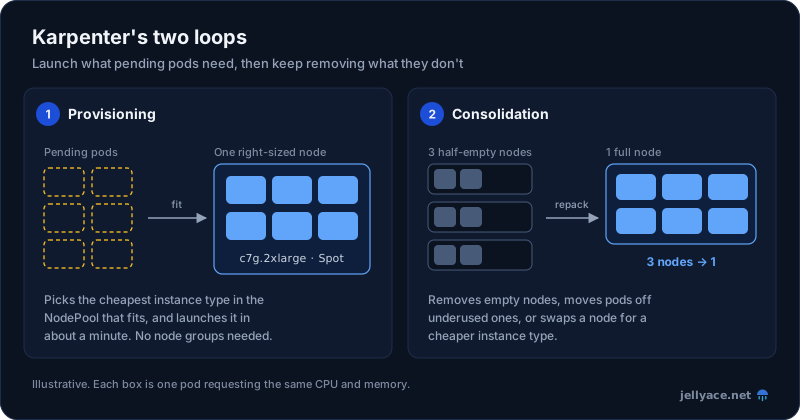
Illustrative. Consolidation respects PodDisruptionBudgets and NodePool disruption budgets.
- Provisioning. When pods are pending, Karpenter works out which instance types in the NodePool could run them and launches the cheapest one that fits. It launches through the EC2 Fleet API, so Spot launches use the
price-capacity-optimizedstrategy. - Disruption. Karpenter keeps checking whether the cluster could be cheaper. It removes empty nodes, moves pods off underused nodes so they can be removed, and replaces nodes with cheaper instance types. It also replaces nodes whose AMI or settings have changed (Karpenter calls this drift) and nodes that reach their maximum lifetime.
What the module creates
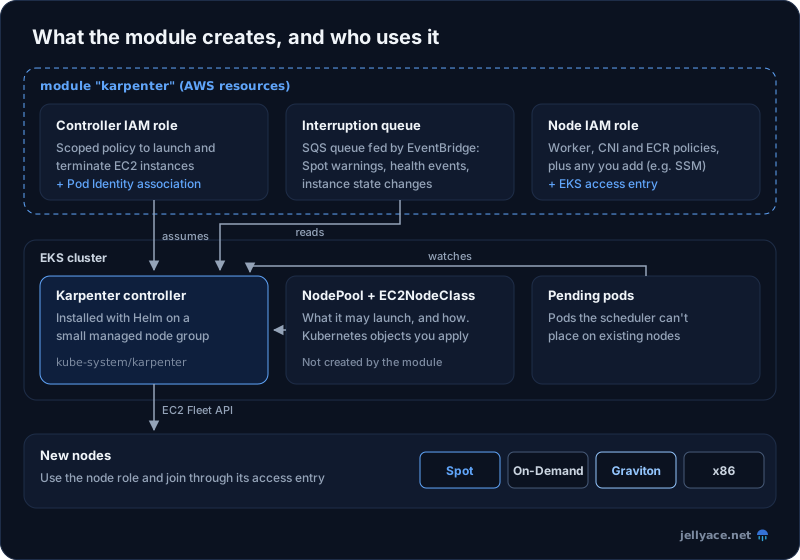
With its defaults, the module creates:
- An IAM role and policy for the Karpenter controller, plus an EKS Pod Identity association that gives the
karpenterservice account inkube-systemthat role. - An IAM role for the nodes, plus an EKS access entry so nodes using it can join the cluster.
- An SQS queue and EventBridge rules that forward Spot interruption warnings, instance health events and instance state changes to Karpenter.
It doesn't install Karpenter itself, and it doesn't create NodePools or EC2NodeClasses. Those are Kubernetes objects. Install Karpenter with Helm and add the NodePools and EC2NodeClasses yourself.
Setting it up with Terraform
The cluster
Karpenter shouldn't run on nodes it manages, because it could remove the node it's running on. Give it a small managed node group of its own, and tag the subnets and security group that Karpenter should launch nodes into:
locals {
  name = "prod"
}

module "eks" {
  source  = "terraform-aws-modules/eks/aws"
  version = "~> 21.15"

  name               = local.name
  kubernetes_version = var.kubernetes_version

  enable_cluster_creator_admin_permissions = true

  addons = {
    coredns                = {}
    eks-pod-identity-agent = { before_compute = true }
    kube-proxy             = {}
    vpc-cni                = { before_compute = true }
  }

  vpc_id     = module.vpc.vpc_id
  subnet_ids = module.vpc.private_subnets

  # Small, stable nodes for Karpenter itself and other cluster add-ons
  eks_managed_node_groups = {
    system = {
      ami_type       = "AL2023_ARM_64_STANDARD"
      instance_types = ["m7g.large"]
      min_size       = 2
      max_size       = 3
      desired_size   = 2

      labels = { "karpenter.sh/controller" = "true" }
    }
  }

  # Karpenter puts new nodes in this security group. Tag only one.
  node_security_group_tags = {
    "karpenter.sh/discovery" = local.name
  }
}
In the VPC module, tag the private subnets the same way:
private_subnet_tags = {
  "kubernetes.io/role/internal-elb" = 1
  "karpenter.sh/discovery"          = local.name
}
The Karpenter module
module "karpenter" {
  source  = "terraform-aws-modules/eks/aws//modules/karpenter"
  version = "~> 21.15"

  cluster_name = module.eks.cluster_name

  # A fixed name, so the EC2NodeClass can refer to it
  node_iam_role_use_name_prefix = false
  node_iam_role_name            = "${local.name}-karpenter-node"

  # Lets you open a shell on nodes with Session Manager instead of SSH
  node_iam_role_additional_policies = {
    AmazonSSMManagedInstanceCore = "arn:aws:iam::aws:policy/AmazonSSMManagedInstanceCore"
  }
}
The module's default namespace (kube-system) and service_account (karpenter) match the Helm chart defaults. If you install Karpenter into another namespace, set namespace here too, or the controller won't get its IAM permissions.
Installing Karpenter with Helm
The chart is in Amazon ECR Public, which needs a token from us-east-1 whatever Region your cluster is in:
provider "helm" {
  kubernetes = {
    host                   = module.eks.cluster_endpoint
    cluster_ca_certificate = base64decode(module.eks.cluster_certificate_authority_data)
    exec = {
      api_version = "client.authentication.k8s.io/v1beta1"
      command     = "aws"
      args        = ["eks", "get-token", "--cluster-name", module.eks.cluster_name]
    }
  }
}

data "aws_ecrpublic_authorization_token" "token" {
  region = "us-east-1"
}

resource "helm_release" "karpenter" {
  namespace           = "kube-system"
  name                = "karpenter"
  repository          = "oci://public.ecr.aws/karpenter"
  repository_username = data.aws_ecrpublic_authorization_token.token.user_name
  repository_password = data.aws_ecrpublic_authorization_token.token.password
  chart               = "karpenter"
  version             = "1.9.0"
  wait                = false

  values = [yamlencode({
    nodeSelector = { "karpenter.sh/controller" = "true" }
    dnsPolicy    = "Default"
    settings = {
      clusterName       = module.eks.cluster_name
      clusterEndpoint   = module.eks.cluster_endpoint
      interruptionQueue = module.karpenter.queue_name
      featureGates = {
        spotToSpotConsolidation = true
      }
    }
  })]
}nodeSelectorkeeps Karpenter on the system node group.dnsPolicy: Defaultlets Karpenter resolve DNS through the VPC resolver instead of cluster DNS (CoreDNS). That matters because Karpenter may be the thing that has to start nodes for CoreDNS.interruptionQueueconnects Karpenter to the module's SQS queue. Without it, Karpenter doesn't see Spot interruption warnings until the instance is gone.spotToSpotConsolidationis covered below.
NodePool and EC2NodeClass
The EC2NodeClass tells Karpenter which AMI to use, and finds subnets and security groups by the tags you added above:
apiVersion: karpenter.k8s.aws/v1
kind: EC2NodeClass
metadata:
  name: default
spec:
  role: prod-karpenter-node # module.karpenter.node_iam_role_name
  amiSelectorTerms:
    - alias: al2023@latest # pin a version in production, see below
  subnetSelectorTerms:
    - tags:
        karpenter.sh/discovery: prod
  securityGroupSelectorTerms:
    - tags:
        karpenter.sh/discovery: prod
  tags:
    karpenter.sh/discovery: prod
The NodePool decides what Karpenter may launch, and when it may take nodes away:
apiVersion: karpenter.sh/v1
kind: NodePool
metadata:
  name: default
spec:
  template:
    spec:
      nodeClassRef:
        group: karpenter.k8s.aws
        kind: EC2NodeClass
        name: default
      expireAfter: 720h # replace every node at least every 30 days
      requirements:
        - key: karpenter.sh/capacity-type
          operator: In
          values: ["spot", "on-demand"]
        - key: kubernetes.io/arch
          operator: In
          values: ["amd64", "arm64"]
        - key: karpenter.k8s.aws/instance-category
          operator: In
          values: ["c", "m", "r"]
        - key: karpenter.k8s.aws/instance-generation
          operator: Gt
          values: ["5"]
        - key: karpenter.k8s.aws/instance-size
          operator: NotIn
          values: ["nano", "micro", "small", "metal"]
  limits:
    cpu: 200 # stop launching once the pool has 200 vCPUs
  disruption:
    consolidationPolicy: WhenEmptyOrUnderutilized
    consolidateAfter: 1m
    budgets:
      - nodes: "10%"
What these settings do:
- Keep the requirements broad. These requirements let Karpenter pick from dozens of instance types, so it can find a good fit and plenty of Spot capacity. Describe the kind of instance you want, not specific types.
- Allowing both architectures means Karpenter can choose Graviton when it's cheaper. Every image the pod runs, including sidecars and agents, then needs an arm64 build. If yours don't have one yet, set
values: ["amd64"]until they do. limitscaps how much the pool can grow. It's your protection against a runaway Deployment.consolidationPolicy:WhenEmptyOrUnderutilizedsaves the most.WhenEmptyonly removes nodes with nothing left on them.consolidateAfteris how long a node must have no pods added or removed before Karpenter considers it. A minute or two stops it reacting to every brief change.budgetslimit how many nodes Karpenter disrupts at once. Ten percent is the default, written out here so it's visible.
Apply both manifests with kubectl or your GitOps tool. Then test with a deployment of pause containers that each request one CPU (the module's example includes one called inflate):
kubectl scale deployment inflate --replicas 10
kubectl get nodeclaims -w
Scale it back to zero and watch the nodes go.
Spot with Karpenter
When a NodePool allows both spot and on-demand, Karpenter uses Spot first and falls back to On-Demand when it can't get Spot capacity. For the strategy itself and why it matters, see our post on Spot allocation strategies.
A few Karpenter-specific points:
- Some workloads must stay on On-Demand. Add
nodeSelector: { karpenter.sh/capacity-type: on-demand }to those pods. Karpenter launches On-Demand capacity for them from the same NodePool. - Interruption warnings go through the queue. When the two-minute Spot warning arrives, Karpenter taints and drains the node and starts a replacement at the same time. It records rebalance recommendations as events but doesn't act on them, unlike Capacity Rebalancing in an Auto Scaling group.
- Spot-to-spot consolidation (the feature flag in the Helm values) lets Karpenter replace a Spot node with a cheaper Spot node, not only remove it. When replacing a single node, it does this only if at least 15 instance types are cheaper than the current one, so broad requirements matter.
- First time using Spot in the account? EC2 needs its service-linked role. If Spot launches fail with a permissions error, create it once:
aws iam create-service-linked-role --aws-service-name spot.amazonaws.com.
Keeping disruption under control
Consolidation moves pods around. That's fine for stateless services and costly for some other workloads, so tell Karpenter what to avoid:
- PodDisruptionBudgets. Karpenter evicts pods through the Kubernetes eviction API, so a PDB on every replicated service stops it from taking too many replicas at once.
karpenter.sh/do-not-disrupt: "true"on a pod stops Karpenter from voluntarily removing its node, for example while a long batch job is running.- Scheduled budgets. For example, no consolidation of underused nodes during office hours:
disruption:
  budgets:
    - nodes: "10%"
    - nodes: "0"
      schedule: "0 9 * * mon-fri" # UTC
      duration: 8h
reasons: ["Underutilized"]terminationGracePeriodon the NodePool template caps how long a node can take to drain. It stops a pod withdo-not-disruptor a misconfigured PDB from keeping an expired node alive forever.
Upgrades and AMIs
The al2023@latest alias always resolves to the newest EKS-optimised AMI for your cluster's Kubernetes version. When AWS publishes a new one, every node becomes drifted, and Karpenter replaces them all, within your disruption budgets. The same happens after a control plane upgrade.
That's convenient in development. In production, pin a release with an alias like al2023@vYYYYMMDD, using a version from the EKS AMI release notes. Then new AMIs roll out when you change the pin: test them in staging first, then bump production.
When you upgrade Karpenter itself, read the upgrade guide for each minor version. Minor releases sometimes change Helm values, IAM permissions or metric names, which can break dashboards and alerts.
Things to watch
- CRDs don't upgrade with the chart. Helm installs the CustomResourceDefinitions (CRDs) bundled in a chart, such as NodePool and NodeClaim, the first time, but never upgrades them. Install the separate
karpenter-crdchart, from the same repository, alongside the main one so CRD changes are applied on upgrade. - NodePools in the same Terraform stack.
kubernetes_manifestneeds the CRDs to exist when Terraform plans, so it fails on a fresh cluster. Manage NodePools in a second stack, with Argo CD or Flux, or with a small Helm chart. - Don't run the controller on Fargate. The module uses EKS Pod Identity, which doesn't work on Fargate. Use the managed node group shown above.
- One security group with the discovery tag. If several security groups carry
karpenter.sh/discovery, nodes get all of them. - DaemonSets count. Karpenter adds every DaemonSet's requests to each new node's size. Heavy agents make every node bigger.
- If you'd rather not run Karpenter yourself, look at EKS Auto Mode. AWS runs Karpenter for you and charges a management fee on top of each instance's price.
Is it worth it?
For a small, steady cluster with one node group, Karpenter is mostly a nicer way to do the same thing. It earns its keep when workloads vary: batch jobs next to web services, some pods needing lots of memory, a push to Spot and Graviton, or a team tired of maintaining node groups. Combined with Spot and Graviton, it's often the biggest single cut to an EKS compute bill. If you're still deciding whether you need Kubernetes at all, start with ECS vs EKS.