Saving on EC2 with Spot Instances: allocation strategies that keep interruptions low
Spot Instances cost up to 90% less than On-Demand, but the allocation strategy decides how often you get interrupted. Here's what each strategy does, which one to pick, and how to set up a Spot fleet that copes with interruptions.
Spot Instances are spare EC2 capacity that AWS sells at up to a 90% discount on On-Demand prices. The catch is that AWS can take them back with two minutes' notice. For the right workloads, that's a good trade: there's no commitment and nothing to buy up front, and the discount is usually much larger than a Savings Plan gives you.
Whether Spot is worth it in practice comes down to two things: running workloads that can handle an interruption, and choosing an allocation strategy that doesn't send you into the pools most likely to be reclaimed.
What runs well on Spot
Spot suits work that is stateless, can be retried, or saves its progress:
- Stateless web and API tiers behind a load balancer, with some On-Demand capacity underneath
- Container worker nodes on ECS or EKS, where the scheduler moves tasks or pods to other nodes
- CI runners, since each job is short and can simply be retried
- Batch, data and analytics jobs that can be retried
- Rendering, ML training and HPC, as long as they checkpoint
- Development and test environments
Keep these on On-Demand (or a Savings Plan):
- Databases and anything else that keeps important state on local disk
- Single instances where an interruption means an outage
- Controllers and other cluster components that must always be running
How Spot capacity works
A Spot capacity pool is one instance type in one Availability Zone: c6i.xlarge in eu-west-1a is one pool and c6i.xlarge in eu-west-1b is another. Each pool has its own price and its own amount of spare capacity.
A few points that save confusion:
- There's no bidding. You pay the current Spot price, which changes slowly with long-term supply and demand. You don't need to set a maximum price, and AWS notes that if you do, your instances are interrupted more often.
- Interruptions are mostly about capacity, not price. EC2 reclaims instances when it needs the capacity back in that pool.
- The more pools you can use, the better. A group that can only launch
m5.largein one AZ depends on one pool. A group that accepts 20 instance types across three AZs can choose from 60 pools.
This is why the allocation strategy matters: it decides which of your pools EC2 launches into.
The allocation strategies
When an Auto Scaling group or EC2 Fleet uses several instance types, the Spot allocation strategy chooses pools for you. AWS introduced price-capacity-optimized in late 2022 as the recommended default for most Spot workloads.
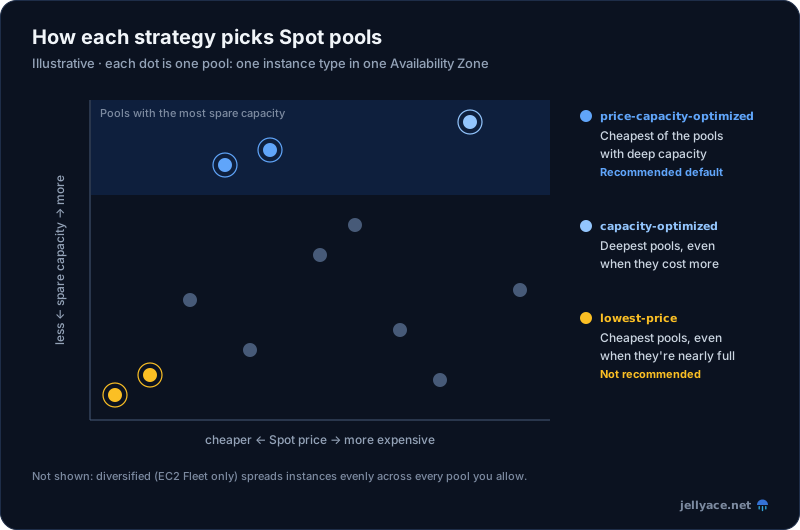
Illustrative. Each dot is one Spot capacity pool; circled dots are the pools each strategy launches into.
| Strategy | How it picks pools | Use it for | Auto Scaling groups | EC2 Fleet |
|---|---|---|---|---|
price-capacity-optimized |
Finds the pools with the most spare capacity, then chooses the cheapest of those | Most workloads. The recommended default | Yes | Yes |
capacity-optimized |
Chooses the pools with the most spare capacity, whatever the price | Workloads with similarly priced instance types, or where an interruption costs more than any extra saving | Yes | Yes |
capacity-optimized-prioritized |
Like capacity-optimized, but follows your instance type order where possible |
When interruptions must be minimised, but you also prefer some instance types | Yes | Yes |
diversified |
Spreads instances across all your pools | Large or long-running fleets that must not lose too much capacity at once | No | Yes |
lowest-price |
Chooses the cheapest pools, ignoring capacity | Not recommended: it has the highest interruption risk | CLI/API only | CLI/API only (default if unset) |
price-capacity-optimized
This strategy uses both signals. First, it identifies the pools with the most spare capacity for the number of instances you're launching. Then it chooses the cheapest of those pools. Instead of chasing the absolute lowest price, it spreads capacity across several low-cost pools that are unlikely to be reclaimed soon.
Because interrupted work has to be redone, a slightly higher hourly price with far fewer interruptions often costs less overall. Start with this strategy. If you already use lowest-price, AWS recommends switching. It's a one-parameter change.
capacity-optimized and capacity-optimized-prioritized
capacity-optimized chooses the deepest pools, even when a cheaper pool has only slightly less capacity. That makes sense when your instance types cost about the same, or when interruptions are very expensive, such as a long render without checkpoints.
The -prioritized version lets you list instance types in order of preference. EC2 follows that order where it can, but capacity still comes first. Use it when you prefer certain types, such as a generation your software has been benchmarked on, but still want to keep interruptions low. If your On-Demand allocation strategy is prioritized, the same order applies to On-Demand capacity.
diversified
Available in EC2 Fleet and Spot Fleet, but not in Auto Scaling groups. It spreads instances evenly across every pool you allow. With 10 pools and 100 instances, each pool gets 10, so losing one pool affects only 10% of the fleet. It's a reasonable option for large, long-running fleets. With this strategy, the fleet won't launch in pools where the Spot price is equal to or higher than the On-Demand price.
lowest-price
This strategy chooses the cheapest pools and ignores how likely they are to be interrupted. It's only available through the CLI or API, and AWS explicitly recommends against it. The catch with EC2 Fleet is that lowest-price is the CLI default, so always set the strategy explicitly.
What the difference looks like
AWS's announcement compared the three main strategies on a 60-instance Auto Scaling group over 30 days. AWS says the numbers are illustrative rather than measured, but they show the trade-off:
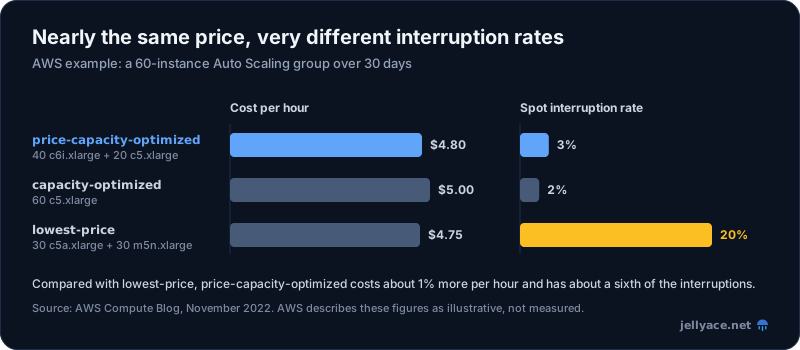
Source: AWS Compute Blog, November 2022. Figures are illustrative.
| Strategy | Instances launched | Cost per hour | Interruption rate |
|---|---|---|---|
price-capacity-optimized |
40 × c6i.xlarge, 20 × c5.xlarge | $4.80 | 3% |
capacity-optimized |
60 × c5.xlarge | $5.00 | 2% |
lowest-price |
30 × c5a.xlarge, 30 × m5n.xlarge | $4.75 | 20% |
Compared with lowest-price, price-capacity-optimized costs about 1% more per hour and has roughly a sixth of the interruptions.
Setting up an Auto Scaling group for Spot
Use the strategy together with three practices: flexible instance types, an On-Demand base, and Capacity Rebalancing. In Terraform:
resource "aws_autoscaling_group" "workers" {
  name                = "workers"
  min_size            = 2
  max_size            = 30
  desired_capacity    = 6
  vpc_zone_identifier = var.private_subnet_ids # spread across every AZ you can

  # Start a replacement when EC2 signals elevated interruption risk,
  # instead of waiting for the two-minute notice.
  capacity_rebalance = true

  mixed_instances_policy {
    instances_distribution {
      on_demand_base_capacity                  = 2 # always-on floor
      on_demand_percentage_above_base_capacity = 0 # everything above it is Spot
      spot_allocation_strategy                 = "price-capacity-optimized"
    }

    launch_template {
      launch_template_specification {
        launch_template_id = aws_launch_template.workers.id
        version            = "$Latest"
      }

      # Attribute-based selection: any current-generation type that fits,
      # instead of a hand-maintained list.
      override {
        instance_requirements {
          vcpu_count {
            min = 4
            max = 8
          }
          memory_mib {
            min = 8192
            max = 32768
          }
          instance_generations  = ["current"]
          burstable_performance = "excluded"
        }
      }
    }
  }
}
A few notes:
- Attribute-based instance type selection (
instance_requirements) usually gives the strategy dozens of instance types to choose from, and new generations are added automatically as AWS releases them. If you list instance types by hand, include at least 10 across several families and generations. - The On-Demand base keeps a minimum capacity running even if Spot capacity drops sharply across your pools. Choose a base that covers the load you can't afford to lose, and buy a Savings Plan for that part. Savings Plans don't apply to Spot.
- Graviton widens your choice further. Arm instances need their own AMI, so add them through a separate launch template per architecture. See moving to Graviton.
On EKS, Karpenter does this for you. When a NodePool allows spot, Karpenter launches capacity with EC2 Fleet's price-capacity-optimized strategy. Allow it a broad set of instance families and sizes. On ECS, use a capacity provider backed by an Auto Scaling group configured as above, or use Fargate Spot (which isn't available on EKS; see ECS vs EKS).
Handling interruptions
Two signals let you react before an instance disappears:
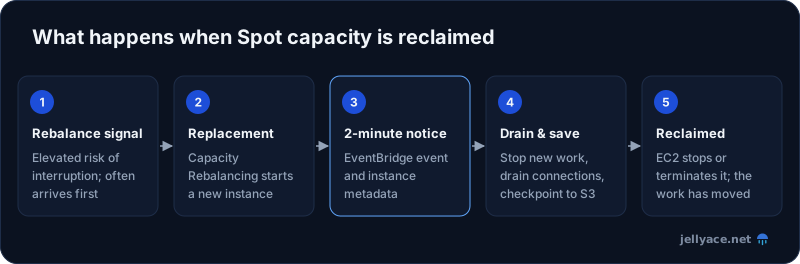
- Rebalance recommendation: EC2 warns that an instance is at elevated risk of interruption. This often arrives earlier than the interruption notice. With
capacity_rebalance = true, the Auto Scaling group launches a replacement first and then terminates the at-risk instance. - Interruption notice: a two-minute warning before EC2 stops, hibernates or terminates the instance.
Both are published to EventBridge and instance metadata. To catch the two-minute notice with an EventBridge rule:
{
  "source": ["aws.ec2"],
  "detail-type": ["EC2 Spot Instance Interruption Warning"]
}
From inside the instance, poll the metadata endpoint, which returns 404 until a notice arrives:
TOKEN=$(curl -s -X PUT "http://169.254.169.254/latest/api/token" \
  -H "X-aws-ec2-metadata-token-ttl-seconds: 300")
curl -s -H "X-aws-ec2-metadata-token: $TOKEN" \
  http://169.254.169.254/latest/meta-data/spot/instance-action
Use those two minutes to stop taking new work, drain connections, and save progress:
- Behind a load balancer, keep the deregistration delay well under two minutes.
- On EKS, Karpenter can handle interruptions itself if you give it an SQS interruption queue. Otherwise, use the AWS Node Termination Handler to cordon and drain the node.
- ECS can drain Spot container instances automatically when
ECS_ENABLE_SPOT_INSTANCE_DRAINING=trueis set in the agent configuration. - For long-running jobs, checkpoint to S3 regularly so a restart only loses a few minutes of work.
Test it. AWS Fault Injection Service can interrupt your Spot Instances on demand, so you can confirm draining works before EC2 does it for real.
Before you switch
- Check the pools. The Spot Instance Advisor shows historical interruption frequency by instance type. A Spot placement score estimates how likely EC2 is to fulfil a request of a given size in a Region or AZ.
- Look at the price history for the instance types you plan to use, so you know the real discount in your Region. The 90% figure is a ceiling, not what you'll usually get.
- Start with non-production or CI, then move stateless production tiers once your draining has been tested.
- Tag Spot capacity so Cost Explorer can show what you're saving.
Spot works best alongside the other checks in cutting your AWS bill: right-size first, cover the steady base with a Savings Plan, and run the flexible part on Spot with price-capacity-optimized.