Google Cloud Run: what it costs, and where to keep your data
Cloud Run runs containers without servers and can scale to zero, but its instances keep nothing. How it bills, when it fits, and every way to give it persistent storage, with real prices and monthly examples.
Cloud Run is Google Cloud's service for running containers without managing servers. You give it a container image, it gives you an HTTPS endpoint, starts as many copies as traffic needs, and stops them all when traffic stops. For most web apps and APIs on Google Cloud, it's the right default.
The catch is that Cloud Run instances are stateless. Anything an instance writes to its own filesystem lives in memory and disappears when the instance stops, and instances stop all the time. So the real design question isn't "how do I run my app?" but "where does my data live, and what does that cost?"
All prices here are for us-central1 (Iowa), a Tier 1 region, as of April 2026.
What Cloud Run is, and when it fits
Cloud Run comes in three shapes:
- Services answer HTTP requests (including WebSockets and gRPC). This is what most people mean by Cloud Run.
- Jobs run a container to completion, for batch work, migrations and scheduled tasks. Tasks can run for up to 7 days.
- Worker pools run containers that don't take requests at all, such as queue consumers. They became generally available this week.
Each instance gets up to 8 vCPU and 32 GiB of memory, and can handle up to 1,000 concurrent requests (80 by default). Requests can run for up to 60 minutes. NVIDIA L4 and RTX PRO 6000 GPUs are available for inference.
It fits well when:
- Traffic is bursty or idle much of the time. APIs, webhooks, internal tools, preview environments. Paying nothing while idle is the main attraction.
- You already ship containers, or are happy to let Cloud Run build one from source.
- The app is stateless, or can be made so by moving state into a managed service.
It fits badly when the app needs a real local disk that survives restarts (a self-hosted database, a search index on disk, a CMS that writes uploads next to its code), or when you need to control the machines underneath. For those, look at Google Kubernetes Engine (GKE) or a Compute Engine VM.
How it bills
Each service uses one of two billing settings. Google renamed them in late 2024, so you'll still see the old names in older guides.
| Request-based billing (default) | Instance-based billing | |
|---|---|---|
| Old name | CPU only allocated during requests | CPU always allocated |
| You pay while | An instance starts, handles at least one request, or shuts down | An instance exists, from start to stop, with a 1-minute minimum |
| vCPU | $0.000024 per second ($0.0864 per hour) | $0.000018 per second ($0.0648 per hour) |
| Memory | $0.0000025 per GiB-second ($0.0090 per hour) | $0.000002 per GiB-second ($0.0072 per hour) |
| Requests | $0.40 per million | Free |
| Idle minimum instances | $0.0000025 per vCPU-second and per GiB-second | Same rate as active |
| Free tier, per month | 180,000 vCPU-seconds, 360,000 GiB-seconds, 2 million requests | 240,000 vCPU-seconds, 450,000 GiB-seconds |
| CPU outside requests | Throttled to almost nothing | Available, so background work runs |
us-central1, April 2026. Billable time is rounded up to the nearest 100 milliseconds. Source: Google Cloud Run pricing.
A few things to understand:
- Request-based billing charges only while requests are in flight. With the default concurrency of 80, one instance handling 50 requests at once is billed once, not 50 times. That's the big difference from Lambda-style per-invocation billing.
- Minimum instances keep instances warm to avoid cold starts. With request-based billing, a warm instance that isn't handling requests costs the idle rate, about a tenth of the active CPU rate. Without minimum instances, idle instances that Cloud Run keeps around (for up to 15 minutes) aren't billed.
- Instance-based billing is 25% cheaper per vCPU-second and has no request charge, but you pay for every second an instance exists. It's the right choice for steady traffic, and required if your code does work after sending the response.
- The free tier is per billing account, shared by every project on it. Both settings' allowances are worth about $5.22 a month.
- Committed use discounts (CUDs) cut the price further for steady usage: 17% for a Cloud Run commitment, and up to 46% with a 3-year Compute flexible commitment that also covers Compute Engine and GKE.
Where the lines cross
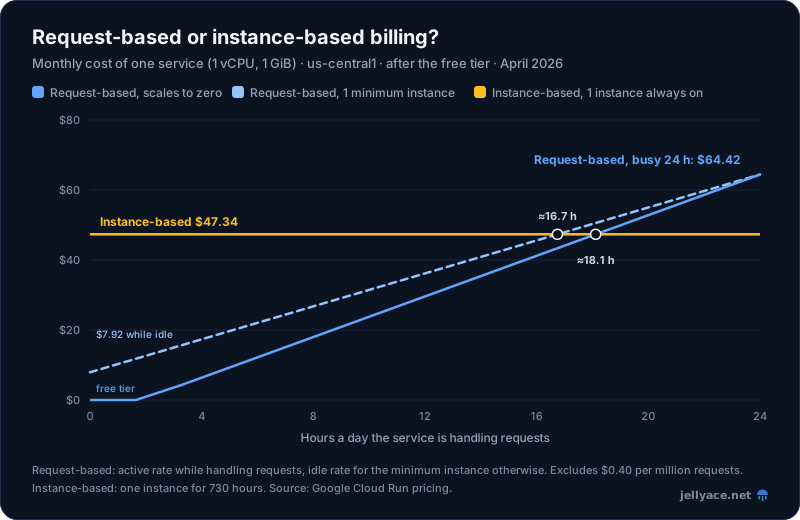
us-central1, April 2026, one instance, after the free tier, excluding request charges. Source: Google Cloud Run pricing.
Some typical workloads:
| Workload | Monthly cost |
|---|---|
| Internal tool, 1 vCPU / 1 GiB, used 2 hours each weekday | $0 (158,400 vCPU-seconds, inside the free tier) |
| Small API scaling to zero, 1 vCPU / 1 GiB, busy 8 hours a day | $17.99, plus $0.40 per million requests above 2 million |
| Small API kept warm, 1 vCPU / 1 GiB, 1 minimum instance, busy 10% of the time | $13.57 (scaling to zero instead: $1.99, but with cold starts) |
| Busy API, 2 instances of 2 vCPU / 4 GiB around the clock, 100 million requests | Instance-based: $226.04. Request-based: $299.63 plus $39.20 for requests, $338.83 |
Start with request-based billing. Once a service is busy for more than about 17 hours a day, switch to instance-based. Cloud Run's recommender will also suggest the switch when it's cheaper.
The storage problem
Every Cloud Run instance can be started, moved or stopped at any time, and several instances run side by side. So there are really only two kinds of storage:
- Inside the instance: fast, no extra service, and gone when the instance stops. Each instance has its own copy.
- Outside the instance: persistent and shared by every instance, but it's another service with its own price.
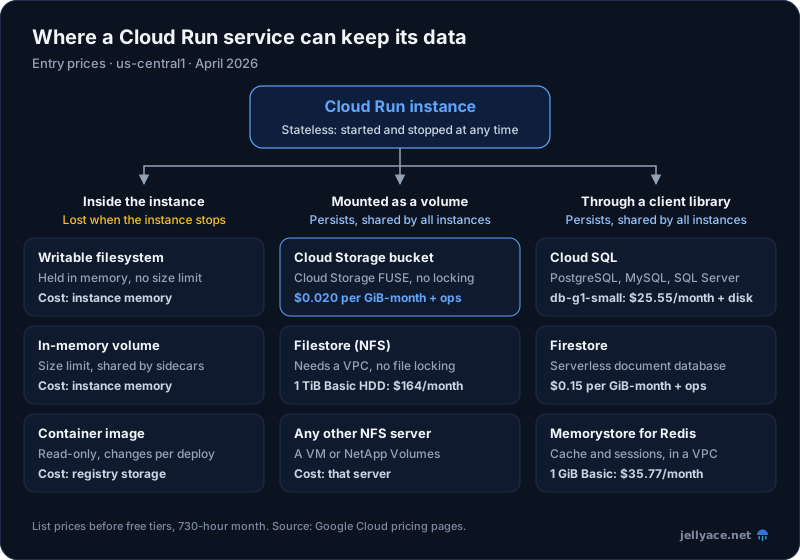
us-central1, April 2026, list prices before free tiers. Source: Google Cloud pricing pages.
Storage inside the instance
The writable filesystem
Your container's filesystem is writable, but it's an in-memory filesystem. Writing a 500 MB file to /tmp uses 500 MB of the instance's memory. There's no size limit other than the memory itself, so a process that writes too much gets the instance killed for running out of memory.
Use it for scratch space: a downloaded file you process and throw away, a rendered image before uploading it, a small cache. Don't use it for anything you need after the request ends.
In-memory volumes
An in-memory volume is the same idea with guard rails. You mount it at a path, set a size limit, and writes beyond the limit fail with an error instead of crashing the instance. It can also be shared between containers in one instance, for example between your app and a sidecar. If you don't set a limit, it defaults to half the total memory of all containers, which can be more than one container has. Always set one.
What memory costs as storage
Memory is billed as Cloud Run memory. An always-on instance pays $0.0072 per GiB-hour on instance-based billing, so a GiB of memory used as disk costs about $5.26 a month. That's about 260 times the price of Cloud Storage. Keep in-memory storage small and temporary.
Mounting shared storage as a volume
Cloud Run can mount two kinds of network storage as directories in your container, with no code changes and nothing to install. Both need the second-generation execution environment, which Cloud Run picks automatically.
Cloud Storage volumes (Cloud Storage FUSE)
You can mount a Cloud Storage bucket at a path such as /data. Under the hood, Cloud Run uses Cloud Storage FUSE (Filesystem in Userspace), which turns file reads and writes into Cloud Storage API calls.
gcloud run services update my-app \
  --add-volume name=uploads,type=cloud-storage,bucket=my-app-uploads \
  --add-volume-mount volume=uploads,mount-path=/data
The service's identity needs the Storage Object Viewer role on the bucket to read, or Storage Object User to write. Add readonly=true to the volume if the app only reads.
It's good for files that are written once and read many times: uploaded images, generated reports, machine learning model weights, static assets. It is not a disk:
- No file locking. If two instances write the same file, the last write wins and the other is lost.
- Not fully POSIX-compliant. Some operations a local filesystem supports behave differently or not at all.
- Every file operation is an API request. Listing a directory, opening a file and writing a file all become Cloud Storage operations, and those are billed.
- It uses memory. Metadata caches, plus about 64 MiB for every file open for writing while it uploads.
Prices for a Standard storage regional bucket:
| Price | |
|---|---|
| Storage | $0.020 per GiB-month |
| Class A operations (writes, lists) | $0.005 per 1,000 |
| Class B operations (reads, metadata) | $0.0004 per 1,000 |
| Data transfer to Cloud Run in the same region | Free |
| Always Free (us-central1, us-east1, us-west1 combined) | 5 GB-months, 5,000 Class A and 50,000 Class B operations a month |
Source: Google Cloud Storage pricing.
Storage is cheap; operations are where a chatty app spends money. A million writes or directory listings cost $5. If your code lists a directory on every request, switch to known file names or keep an index elsewhere.
NFS volumes and Filestore
You can also mount a Network File System (NFS) share. Google's managed NFS service is Filestore, but any NFS server in your network works. The Cloud Run service must be connected to the Virtual Private Cloud (VPC) network where the server lives, ideally with Direct VPC egress rather than a Serverless VPC Access connector (connectors run on VMs you pay for).
NFS behaves much more like a normal disk than Cloud Storage FUSE does: low latency, in-place edits and fast directory operations. Two limits remain:
- No file locking. Cloud Run mounts NFS volumes in no-lock mode.
- Permissions. By default Filestore lets only the root user write. If your container runs as another user, change the share's ownership first.
The real issue with Filestore is the price. You pay for provisioned capacity, not what you store, and the smallest sizes are large:
| Filestore tier | Price | Smallest instance | Smallest monthly bill |
|---|---|---|---|
| Basic HDD | $0.16 per GiB-month | 1 TiB | $163.84 |
| Zonal | $0.25 per GiB-month | 1 TiB | $256.00 |
| Regional | $0.45 per GiB-month | 1 TiB | $460.80 |
| Basic SSD | $0.30 per GiB-month | 2.5 TiB | $768.00 |
us-central1, April 2026, without custom performance. Regional instances from 100 GiB were in restricted availability in us-central1 and us-east4 only. Source: Google Cloud Filestore pricing.
Storing 1 TiB in Cloud Storage costs $20.48 a month. So choose Filestore only when you really need filesystem behaviour that Cloud Storage FUSE can't give you, such as an existing app that edits files in place or makes many small reads and writes.
Databases and caches
For most apps, the right answer isn't a filesystem at all. Put structured data in a database and files in Cloud Storage, and call both from your code.
Cloud SQL
Cloud SQL is managed PostgreSQL, MySQL or SQL Server. Cloud Run connects to it securely through a Unix socket at /cloudsql/INSTANCE_CONNECTION_NAME, with no IP allow-lists or proxy sidecars to run.
gcloud run services update my-app --add-cloudsql-instances=my-project:us-central1:my-dbIt doesn't scale to zero: the instance runs, and bills, all month. Prices for the Enterprise edition:
| Instance | Memory | Per month | With high availability (HA) |
|---|---|---|---|
| db-f1-micro (shared CPU) | 0.6 GiB | $7.67 | $15.33 |
| db-g1-small (shared CPU) | 1.7 GiB | $25.55 | $51.10 |
| 1 vCPU (dedicated) | 3.75 GiB | $49.31 | $98.62 |
| SSD storage | $0.17 per GiB | $0.34 per GiB |
us-central1, April 2026, 730 hours, on demand. Source: Google Cloud SQL pricing.
Shared-core machines have no service level agreement (SLA), so they're for development and small, non-critical apps. New PostgreSQL 16+ and MySQL 8.4+ instances default to the more expensive Enterprise Plus edition; choose Enterprise explicitly if you want these prices.
Firestore
Firestore is a serverless document database. Like Cloud Run, it charges per use and costs almost nothing when idle, which makes it a natural partner for services that scale to zero. It works much like DynamoDB on AWS: design your documents around your queries (see DynamoDB for API backends for the same thinking applied there).
| Price | Free every day | |
|---|---|---|
| Document reads | $0.03 per 100,000 | 50,000 |
| Document writes | $0.09 per 100,000 | 20,000 |
| Document deletes | $0.01 per 100,000 | 20,000 |
| Stored data | $0.15 per GiB-month | 1 GiB in total |
Standard edition, us-central1 location, April 2026. The free quota applies to one database per project. Source: Google Cloud Firestore pricing.
Memorystore
Memorystore for Redis gives you a managed Redis instance for caching, sessions and rate limits. It lives in your VPC, so Cloud Run reaches it through Direct VPC egress. A 1 GiB Basic instance costs $0.049 per GiB-hour, or $35.77 a month; the Standard tier, with a replica for failover, costs $46.72. Memorystore also offers Valkey, an open-source fork of Redis, priced per node.
Before adding one, check whether you need it: a small in-memory cache inside each instance is free, and Firestore or Cloud SQL may be fast enough on their own.
Other options
- Spanner and AlloyDB for PostgreSQL for relational workloads beyond what Cloud SQL handles comfortably.
- Bigtable for very large, high-throughput key-value data.
- Secret Manager for credentials and configuration, mounted as files or environment variables. It's not a database.
Worked example: a small SaaS app
One Cloud Run service (1 vCPU, 1 GiB) scaling to zero, busy 8 hours a day, with 5 million requests a month. Users upload files, and the app keeps relational data.
| Item | Monthly cost |
|---|---|
| Cloud Run compute, request-based, after the free tier | $17.99 |
| Requests: 3 million above the free 2 million | $1.20 |
| Cloud SQL PostgreSQL, db-g1-small, 20 GiB SSD | $28.95 |
| Cloud Storage: 50 GiB of uploads, 200,000 writes, 2 million reads | $2.80 |
| Total | $50.94 |
The database is more than half the bill, and it's the only part that costs money while nobody's using the app. If the data fits a document model, Firestore instead of Cloud SQL (10 million reads, 2 million writes and 5 GiB stored, after the free quota over a 30-day month) costs $4.41, bringing the total to $26.40.
A Filestore Basic HDD share in place of Cloud Storage would add $163.84 and more than triple the bill.
Which storage for what
| You need to store | Use | Why |
|---|---|---|
| Scratch files during a request | The writable filesystem, or an in-memory volume with a limit | Free, fast, gone afterwards |
| User uploads, reports, media, model files | Cloud Storage, via the client library or a volume mount | Cheapest, durable, no minimum |
| Relational data, transactions, joins | Cloud SQL | Standard SQL, managed backups |
| Key-value or document data, spiky traffic | Firestore | Pay per operation, no idle cost |
| Sessions, caches, rate limits | Memorystore, or Firestore with a time to live (TTL) | Sub-millisecond reads |
| An app that insists on a shared POSIX filesystem | Filestore | The only option that behaves like a disk |
| A database engine you run yourself | Not Cloud Run: use GKE or a VM | Cloud Run has no persistent local disk |
Things to watch
- Don't put a database on a volume mount. SQLite, or any engine that relies on file locks, can corrupt its data on Cloud Storage FUSE or on NFS mounted without locking. Use Cloud SQL or Firestore.
- The writable filesystem uses memory. Large downloads to
/tmpcan push an instance over its memory limit and kill it, along with every request it's handling. - Database connections multiply. Each Cloud Run instance can open up to 100 connections to Cloud SQL, and a db-f1-micro running PostgreSQL allows only 25 by default. Use a small connection pool per instance and set a maximum number of instances so a traffic spike can't exhaust the database.
- Cloud SQL storage only grows. Automatic storage increases are permanent. Set an increase limit so one large import doesn't leave you paying for a much bigger disk.
- Filestore and Memorystore need a VPC. Use Direct VPC egress. Serverless VPC Access connectors work too, but they run on Compute Engine VMs you pay for.
- Background work needs instance-based billing. With request-based billing, CPU is throttled once the response is sent, so "fire and forget" tasks stall. Use instance-based billing, a job, or a queue such as Cloud Tasks or Pub/Sub.
- Minimum instances are best effort. They usually stay warm, but they can be restarted at any time. Never keep state in them.
- Watch operation counts on mounted buckets. A loop that lists or checks files can cost more in Class A operations than the storage itself.
If you're coming from AWS
Loosely:
- Cloud Run services are like ECS on Fargate with scale to zero and an HTTPS endpoint built in, or like App Runner. Request-based billing feels like Lambda, but it's billed per instance rather than per invocation, so concurrent requests share the cost. (We compared the AWS container options in ECS vs EKS.)
- Local storage is the big difference. Fargate tasks get 20 GiB of ephemeral disk by default (up to 200 GiB), and Lambda gets up to 10 GiB in
/tmp. Cloud Run's writable filesystem is memory, so large temporary files cost memory. - Cloud Storage volumes are like Mountpoint for Amazon S3: good for reading and writing whole files, bad for editing them.
- Filestore fills the role of Amazon EFS, but bills very differently. EFS charges for what you store; Filestore charges for what you provision, starting at 1 TiB. Small shared filesystems are much cheaper on AWS.
- Cloud SQL is RDS, Firestore is closest to DynamoDB, and Memorystore is ElastiCache.
The cost habits carry over too: idle databases, oversized disks and forgotten minimum instances are where the money goes, on either cloud (see cutting your AWS bill).
Conclusion
Cloud Run is cheap and simple as long as you treat instances as disposable. Use request-based billing and scale to zero for most services, and switch to instance-based billing once a service is busy most of the day.
For storage, keep files in Cloud Storage, data in Firestore or Cloud SQL, and only scratch space inside the instance. Reach for Filestore only when an app truly needs a shared filesystem, because its 1 TiB minimum usually costs more than everything else combined. Check prices for your own region in the Google Cloud pricing calculator before you commit.