DynamoDB for API backends: data modelling, integrations and costs
Why DynamoDB suits APIs on AWS, how to design a table around your endpoints, the ways to connect it (Lambda, API Gateway with no code, AppSync, containers), and what it costs per million requests.
Most APIs do the same few things thousands of times a day: fetch one record by ID, list a user's records newest first, create a record, update a status. DynamoDB is built for exactly that. It returns single items in single-digit milliseconds at any scale, charges per request, and needs no servers, connection pools or maintenance windows.
The catch is that you design the table around your API's requests up front. Done that way, DynamoDB is often the simplest and cheapest database an API can have.
Why it suits APIs
| DynamoDB | A relational database (RDS / Aurora) | |
|---|---|---|
| Connections | Plain HTTPS requests, no connection pool | Persistent connections, limited by instance size |
| With Lambda | Works at any concurrency | Needs RDS Proxy to avoid running out of connections |
| Authentication | IAM roles, no database passwords | Usernames and passwords (or IAM auth on top) |
| Scaling | Automatic with on-demand capacity | Bigger instances, read replicas |
| Idle cost | Storage only, on on-demand capacity | The instance runs, and bills, all the time |
| Queries | By key, designed in advance | Anything SQL can express |
That last row is the trade-off. DynamoDB answers the questions you designed it for very quickly, and other questions slowly or not at all.
Design the table from your endpoints
Start with the list of API requests, not a list of entities. Take a simple multi-tenant orders API:
| Endpoint | Access pattern |
|---|---|
GET /orders/{id} |
Get one order in a tenant |
GET /orders |
List a tenant's orders, newest first, paginated |
GET /customers/{id}/orders |
List one customer's orders |
POST /orders |
Create an order, safely retried |
PATCH /orders/{id} |
Update an order without overwriting someone else's change |
One table can serve all of these. Items for one tenant share a partition key (PK), and a sort key (SK) orders them within it:
| PK | SK | GSI1PK | GSI1SK | Other attributes |
|---|---|---|---|---|
TENANT#acme |
ORDER#01JF3Q8Z6K... |
CUSTOMER#c_42 |
ORDER#01JF3Q8Z6K... |
status, total, version |
TENANT#acme |
ORDER#01JF3QB2M1... |
CUSTOMER#c_17 |
ORDER#01JF3QB2M1... |
status, total, version |
TENANT#acme |
CUSTOMER#c_42 |
name, email |
Two choices make this work:
- Order IDs are ULIDs, which sort by creation time. So
SKboth identifies an order (forGetItem) and sorts orders newest first (forQuery), with no separate date index. - A global secondary index (GSI1) keyed on the customer answers "this customer's orders". Only orders have
GSI1PK, so customers and other items don't take up space in the index.
Every endpoint then becomes a single, cheap request: GetItem on PK and SK, or a Query on a partition key with begins_with(SK, "ORDER#").
Calling it from Lambda
With API Gateway and Lambda, the AWS SDK v3 document client lets you use plain JavaScript objects:
import { DynamoDBClient } from "@aws-sdk/client-dynamodb";
import { DynamoDBDocumentClient, GetCommand, QueryCommand } from "@aws-sdk/lib-dynamodb";

// Created once per Lambda environment and reused across invocations
const ddb = DynamoDBDocumentClient.from(new DynamoDBClient({}));
const TABLE = process.env.TABLE_NAME!;

export async function getOrder(tenantId: string, orderId: string) {
  const { Item } = await ddb.send(
    new GetCommand({ TableName: TABLE, Key: { PK: `TENANT#${tenantId}`, SK: `ORDER#${orderId}` } }),
  );
  return Item; // undefined means 404
}

export async function listOrders(tenantId: string, cursor?: string) {
  const res = await ddb.send(
    new QueryCommand({
      TableName: TABLE,
      KeyConditionExpression: "PK = :pk AND begins_with(SK, :order)",
      ExpressionAttributeValues: { ":pk": `TENANT#${tenantId}`, ":order": "ORDER#" },
      ScanIndexForward: false, // newest first
      Limit: 25,
      ExclusiveStartKey: cursor ? JSON.parse(Buffer.from(cursor, "base64url").toString()) : undefined,
    }),
  );

  return {
    items: res.Items ?? [],
    // An opaque cursor for the client's next request
    nextCursor: res.LastEvaluatedKey
      ? Buffer.from(JSON.stringify(res.LastEvaluatedKey)).toString("base64url")
      : undefined,
  };
}
DynamoDB's pagination maps directly onto API pagination: return LastEvaluatedKey as an opaque cursor and pass it back as ExclusiveStartKey. Before trusting a cursor, check that its PK matches the caller's tenant. Better still, sign or encrypt it, so clients can't change it.
Patterns APIs need, built in
Safe retries for creates. Clients retry on timeouts, and you don't want two orders. Write with a condition so the same ID can't be created twice:
import { ConditionalCheckFailedException } from "@aws-sdk/client-dynamodb";
import { PutCommand } from "@aws-sdk/lib-dynamodb";

try {
  await ddb.send(
    new PutCommand({
      TableName: TABLE,
      Item: { PK: `TENANT#${tenantId}`, SK: `ORDER#${orderId}`, ...order, version: 1 },
      ConditionExpression: "attribute_not_exists(PK)",
    }),
  );
} catch (err) {
  if (err instanceof ConditionalCheckFailedException) {
    // Already created by an earlier attempt: return the existing order with 200
  } else throw err;
}
If the client sends an idempotency key, use it to derive orderId, so a retry hits the same item.
No lost updates. Keep a version attribute and update only if it hasn't changed since the client read it (ConditionExpression: "version = :expected"). If the condition fails, return 409 Conflict or 412 Precondition Failed. That's optimistic locking, with no row locks.
Several writes at once. TransactWriteItems writes up to 100 items atomically, for example an order and its stock reservation. Transactional writes cost twice as much as normal writes, so use them where you need them.
Data that expires. Set a TTL attribute on sessions, idempotency records or one-time tokens, and DynamoDB deletes them for free, usually within a few days of expiry. Filter out expired items when you read, because they can linger after expiry until DynamoDB deletes them.
Four ways to connect it to your API
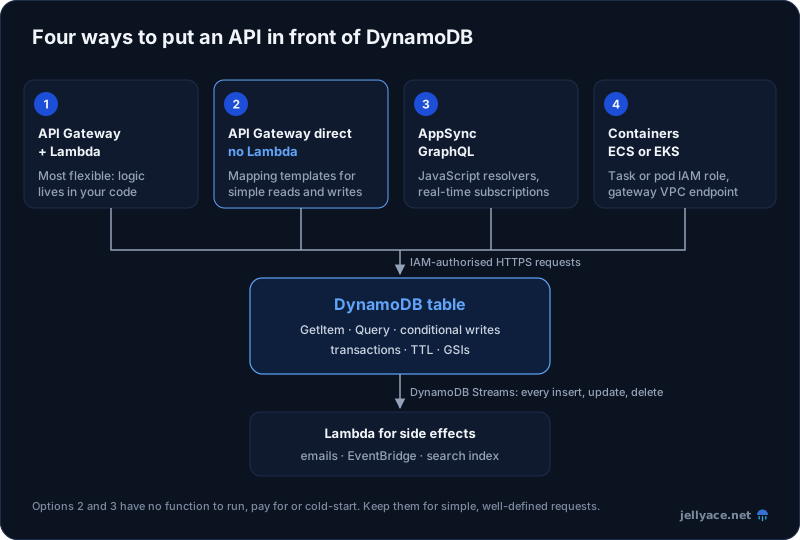
1. API Gateway and Lambda
The most common setup, and the most flexible: validation, authorization and business logic live in your code. Give the function a role that can reach only its own table. Note that the SDK v3 for Node.js already reuses connections between requests, so there's no keep-alive setting to add.
2. API Gateway straight to DynamoDB, no Lambda
For simple reads and writes, a REST API in API Gateway can call DynamoDB itself. A mapping template turns the HTTP request into a DynamoDB request:
resource "aws_api_gateway_integration" "get_order" {
  rest_api_id             = aws_api_gateway_rest_api.api.id
  resource_id             = aws_api_gateway_resource.order.id
  http_method             = "GET"
  type                    = "AWS"
  integration_http_method = "POST"
  uri                     = "arn:aws:apigateway:${var.region}:dynamodb:action/GetItem"
  credentials             = aws_iam_role.apigw_orders_read.arn

  request_templates = {
    "application/json" = <<-EOT
      {
        "TableName": "${aws_dynamodb_table.app.name}",
        "Key": {
          "PK": { "S": "TENANT#$context.authorizer.tenantId" },
          "SK": { "S": "ORDER#$util.escapeJavaScript($input.params('id'))" }
        }
      }
    EOT
  }
}
There's no function to run, pay for or cold-start. The downside is that the logic lives in Velocity templates (VTL), which are awkward to test and debug, so keep this for simple endpoints such as lookups and status checks. You also need a response template to turn DynamoDB's typed JSON into a clean response. HTTP APIs don't offer this integration; it's REST APIs only.
3. AppSync for GraphQL
AppSync resolvers can read and write DynamoDB directly, written in JavaScript:
import * as ddb from "@aws-appsync/utils/dynamodb";

export function request(ctx) {
  return ddb.get({
    key: { PK: `TENANT#${ctx.identity.claims["custom:tenantId"]}`, SK: `ORDER#${ctx.args.id}` },
  });
}

export const response = (ctx) => ctx.result;
Like the direct integration, there's no Lambda in the path, but the resolvers are ordinary JavaScript. AppSync also adds real-time subscriptions.
4. Containers on ECS or EKS
Services in containers use the same SDK with an IAM role for the task or pod (ECS task roles, or EKS Pod Identity). Add a gateway VPC endpoint for DynamoDB so traffic from private subnets doesn't pass through a NAT Gateway: the endpoint is free, and NAT charges per GB (see cutting your AWS bill).
React to changes with Streams
Turn on DynamoDB Streams and a Lambda function receives every insert, update and delete, in order per item. That's where side effects belong: send the confirmation email, publish to EventBridge, update a search index. The API stays fast, and you can't forget a side effect on some code path. Lambda's reads from the stream aren't charged; you pay only for the function.
Tenant isolation with IAM
Because DynamoDB uses IAM, you can limit a role to items whose partition key belongs to one tenant:
{
  "Effect": "Allow",
  "Action": ["dynamodb:GetItem", "dynamodb:Query", "dynamodb:PutItem", "dynamodb:UpdateItem"],
  "Resource": "arn:aws:dynamodb:eu-west-1:123456789012:table/app",
  "Condition": {
    "ForAllValues:StringLike": {
      "dynamodb:LeadingKeys": ["TENANT#${aws:PrincipalTag/tenantId}"]
    }
  }
}
With session tags carrying the tenant ID, even a bug in your code can't read another tenant's items. It's a strong guardrail for SaaS APIs on top of the checks in your application.
What it costs
On-demand prices in US East (N. Virginia), Standard table class:
| Price | |
|---|---|
| Writes | $0.625 per million write request units (1 KB each) |
| Reads | $0.125 per million read request units (4 KB, strongly consistent) |
| Eventually consistent reads | Half a read request unit each |
| Transactions | Twice the normal read or write price |
| Storage | $0.25 per GB-month |
| Free tier (always) | 25 GB of storage, plus 25 read and 25 write capacity units on provisioned capacity |
AWS cut on-demand prices by half in November 2024, and those prices still apply.
For a typical API, with 80% eventually consistent reads and 20% writes of items under 1 KB:
- 1 million requests: about $0.18
- 10 million requests a month: about $1.75
- 100 million: about $17.50
A GSI adds the cost of writing to the index each time an item in it changes, so for that customer index, budget roughly double for order writes.
On-demand or provisioned?
Provisioned capacity charges per hour for the throughput you reserve ($0.00065 per write capacity unit and $0.00013 per read capacity unit), with auto scaling adjusting it. For steady traffic it's much cheaper:
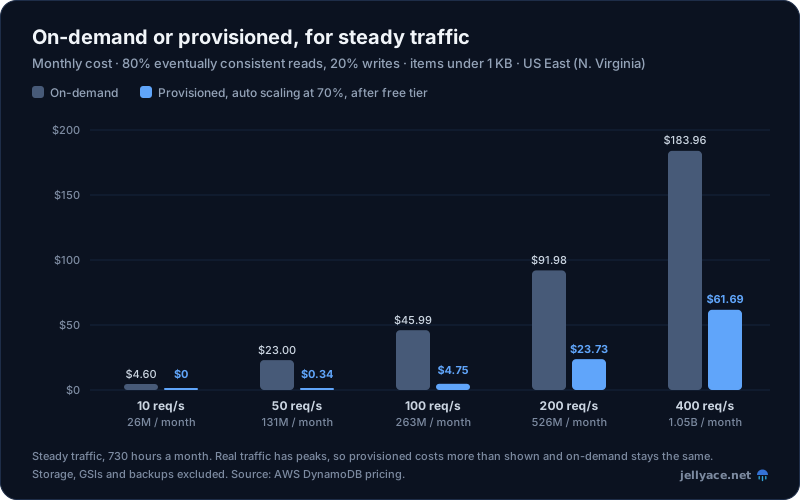
Steady traffic around the clock, 80% eventually consistent reads and 20% writes, items under 1 KB. Provisioned uses auto scaling at a 70% target and includes the free tier. US East (N. Virginia).
Still, start with on-demand. It needs no planning, absorbs spikes and costs nothing when idle, and at small volumes the difference is a few dollars. Switch to provisioned with auto scaling once traffic is steady and the bill matters. You can switch a table from provisioned to on-demand up to four times in 24 hours, and back to provisioned at any time. On-demand also lets you set a maximum throughput per table, a cheap guard against a runaway client running up the bill.
When not to use DynamoDB
- Ad-hoc queries and reporting. If people will ask questions you haven't designed for, use a relational database, or export DynamoDB to S3 and query it with Athena.
- Lots of relationships and joins, such as complex filtering across many entities. That's what SQL is for.
- Full-text or fuzzy search. Stream changes into OpenSearch.
- Access patterns you don't know yet. Early prototypes change shape weekly. PostgreSQL is a fine default until the API settles.
Things to watch
- Hot partitions. Each partition handles up to 1,000 write units and 3,000 read units per second, and all items with the same partition key value start in one partition. A single
PKfor "all orders" can't scale; spread load across many keys, such as tenants or users. - Scans read the whole table. A
Scanbehind an endpoint gets slower and more expensive as data grows. If an endpoint needs one, it needs an index instead. - Filter expressions don't reduce cost. DynamoDB reads, and bills for, items before filtering them. Design keys so queries return only what you need.
- Limits. Items can be up to 400 KB, and each query returns at most 1 MB per page. Store large documents in S3 and keep a pointer.
- GSIs are eventually consistent. A newly created order may take a moment to appear in the customer index. Read from the table when you must see your own write.
- Turn on the safety features: point-in-time recovery for accidental writes, and deletion protection so a stray
terraform destroycan't remove the table.
Getting started
Write down your endpoints and their access patterns first, then design keys that answer each one with a single GetItem or Query. Start with on-demand capacity, connect through Lambda or directly from API Gateway, and push side effects to Streams. For most API backends, you'll end up with a database you rarely think about and a bill measured in dollars rather than hundreds.