Setting up AWS WAF: managed rules, rate limits, CloudFront vs regional, and costs
How AWS WAF works, which managed rule groups to start with, how to attach it to CloudFront or an ALB with Terraform, what it costs per month, and the settings that stop it from blocking your own users.
AWS WAF (Web Application Firewall) inspects HTTP requests before they reach your application and decides whether to allow, block, count or challenge each one. It sits in front of CloudFront, Application Load Balancers (ALBs), API Gateway and a handful of other services, so you add it without changing application code.
A sensible starting setup takes an afternoon and costs around $16 a month at 10 million requests. Most of the work is not switching it on but tuning it so it blocks attackers and not your customers.
What it protects against
| Threat | How WAF handles it |
|---|---|
| Common exploits: SQL injection, cross-site scripting (XSS), path traversal | AWS managed rule groups match known attack patterns |
| Known exploit payloads, such as Log4j-style lookups | The Known bad inputs rule group |
| Traffic from botnets, scanners and anonymising proxies | IP reputation and Anonymous IP list rule groups |
| Floods from single clients, credential stuffing, scraping | Rate-based rules, Bot Control, Account Takeover Prevention |
| Traffic from places you don't serve | Geographic match rules |
| Application layer (layer 7) distributed denial of service (DDoS) | Rate-based rules, plus the paid anti-DDoS managed rule group |
What it doesn't do: fix vulnerable code, understand your business logic, or stop network-level floods (that's AWS Shield, which every account gets for free at the standard tier). Treat WAF as a filter that removes the noise and the obvious attacks, not as a replacement for patching and input validation.
The building blocks
- Web ACL (access control list). The thing you attach to a resource. It holds an ordered list of rules and a default action (usually Allow) for requests no rule terminates. The newer console calls web ACLs protection packs; the API and Terraform still say web ACL.
- Rules. Each rule has a statement (what to match) and an action: Allow, Block, Count, CAPTCHA or Challenge. Rules run in priority order, lowest number first. Allow and Block end evaluation; Count records a match and carries on.
- Rule groups. Reusable bundles of rules. You can write your own, use AWS managed rule groups, or subscribe to ones from AWS Marketplace sellers.
- Web ACL capacity units (WCUs). Every rule has a cost in WCUs depending on how much work it does. A web ACL gets 1,500 WCUs at the standard price and can go up to 5,000 for an extra per-request fee.
- Labels. Rules can attach labels to a request, such as
awswaf:managed:aws:core-rule-set:SizeRestrictions_Body. Later rules can match on those labels, which is how you build exceptions without editing managed rules. - Scope-down statements. A filter on a rate-based rule or a managed rule group so it only looks at some requests, for example only
POST /login. This is how you make expensive rule groups affordable.
Rate-based rules and custom rules
A rate-based rule counts requests per key (usually the client IP) over an evaluation window of 1, 2, 5 or 10 minutes, and applies its action to keys over the limit until they drop below it. The lowest limit is 10 requests per window. You can also aggregate on headers, cookies, query arguments, labels, Autonomous System Numbers (ASNs) or TLS fingerprints, or combinations of up to five keys.
Custom rules match on anything in the request: IP sets, country, headers, URI path, query string, body, JSON fields, ASN or regex patterns, combined with AND, OR and NOT. Typical uses are an IP allow list for an admin path, a geo block, or blocking a user agent that's hammering an endpoint.
AWS managed rule groups
AWS maintains these and updates them as new attacks appear. Most are free beyond the usual $1 per rule group per month; Bot Control and Fraud Control have their own fees.
| Rule group | What it does | WCUs | Use it? |
|---|---|---|---|
Core rule set (AWSManagedRulesCommonRuleSet) |
Broad protection based on the OWASP Top 10: XSS, path traversal, oversized requests, bad user agents | 700 | Yes, almost always |
Known bad inputs (AWSManagedRulesKnownBadInputsRuleSet) |
Request patterns known to be malicious, such as Log4j and Java deserialisation exploits | 200 | Yes |
Amazon IP reputation list (AWSManagedRulesAmazonIpReputationList) |
IPs Amazon's threat intelligence has seen attacking or scanning | 25 | Yes, cheap and low risk |
Anonymous IP list (AWSManagedRulesAnonymousIpList) |
VPNs, Tor, proxies and hosting providers | 50 | Only if real users don't come through VPNs or clouds |
SQL database (AWSManagedRulesSQLiRuleSet) |
SQL injection patterns | 200 | Yes if you have a SQL database behind the app |
| Linux / POSIX operating system | Local file inclusion and command injection against Linux and Unix hosts | 200 / 100 | If you run on Linux, which is most of us |
Bot Control (AWSManagedRulesBotControlRuleSet) |
Common level: self-identifying bots, scrapers, crawlers. Targeted level: sophisticated bots using browser fingerprinting and behaviour | 50 | When bots are a measurable problem |
| Account Takeover Prevention (ATP) | Credential stuffing and brute force on your login endpoint, including checks against stolen credentials | 50 | On login only, scoped down |
| Account Creation Fraud Prevention (ACFP) | Fake sign-ups | 50 | On sign-up only, scoped down |
There are also rule groups for PHP, WordPress, Windows and admin paths. Pick the ones that match your stack: each one you add costs WCUs and $1 a month, and an irrelevant rule group only adds false positives.
A good default for a typical web app or API is IP reputation, Core rule set, Known bad inputs, plus SQL database if you use one. That's 925 to 1,125 WCUs, leaving room for your own rules under the 1,500 default.
CloudFront or regional
A web ACL has a scope, and it must match the resource you attach it to:
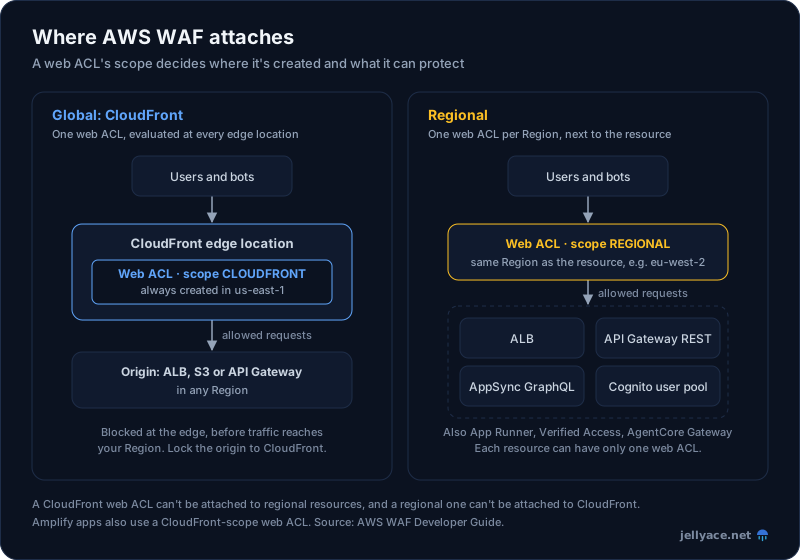
One web ACL can protect many resources of its type, but each resource has at most one web ACL. A CloudFront web ACL can't be attached to regional resources, and the reverse.
CloudFront (scope CLOUDFRONT) |
Regional (scope REGIONAL) |
|
|---|---|---|
| Where you create it | US East (N. Virginia), us-east-1, always |
The same Region as the resource |
| What it protects | CloudFront distributions (and AWS Amplify apps) | ALB, API Gateway REST APIs, AppSync, Cognito user pools, App Runner, Verified Access, Bedrock AgentCore Gateway |
| Where requests are inspected | At edge locations, close to the client | In the Region, after the request has crossed the internet |
| Default body inspection | 16 KB, up to 64 KB | 16 KB for API Gateway, Cognito, App Runner and Verified Access (up to 64 KB); a fixed 8 KB for ALB and AppSync |
| Logs and metrics | In us-east-1 |
In the resource's Region |
| Rule groups, IP sets, regex sets | Must also be in us-east-1 |
Must be in the same Region |
If you already use CloudFront, put WAF there. Attacks are dropped at the edge, cached responses don't hit your origin anyway, and one web ACL covers every distribution. Then make sure the origin can't be reached directly, or attackers just go around it (more on that below). The CloudFront, S3 and ALB caching post covers that setup.
Use a regional web ACL when there's no CloudFront in front, for internal-facing ALBs, for API Gateway and Cognito, or as a second layer behind CloudFront with different rules. API Gateway HTTP APIs aren't supported; only REST APIs are.
A Terraform example
A regional web ACL for an ALB, with three managed rule groups and two rate-based rules, plus logging:
locals {
  managed_groups = {
    # name                                   = priority
    AWSManagedRulesAmazonIpReputationList   = 10
    AWSManagedRulesCommonRuleSet            = 20
    AWSManagedRulesKnownBadInputsRuleSet    = 30
  }
}

resource "aws_wafv2_web_acl" "app" {
  name  = "app-regional"
  scope = "REGIONAL"

  default_action {
    allow {}
  }

  # Tight limit on login: 20 POSTs per IP per 5 minutes
  rule {
    name     = "rate-login"
    priority = 0

    action {
      block {}
    }

    statement {
      rate_based_statement {
        limit                 = 20
        evaluation_window_sec = 300
        aggregate_key_type    = "IP"

        scope_down_statement {
          byte_match_statement {
            search_string         = "/login"
            positional_constraint = "STARTS_WITH"
            field_to_match {
              uri_path {}
            }
            text_transformation {
              priority = 0
              type     = "LOWERCASE"
            }
          }
        }
      }
    }

    visibility_config {
      cloudwatch_metrics_enabled = true
      metric_name                = "rate-login"
      sampled_requests_enabled   = true
    }
  }

  # Loose limit on everything: 2,000 requests per IP per 5 minutes
  rule {
    name     = "rate-per-ip"
    priority = 1

    action {
      block {}
    }

    statement {
      rate_based_statement {
        limit                 = 2000
        evaluation_window_sec = 300
        aggregate_key_type    = "IP"
      }
    }

    visibility_config {
      cloudwatch_metrics_enabled = true
      metric_name                = "rate-per-ip"
      sampled_requests_enabled   = true
    }
  }

  dynamic "rule" {
    for_each = local.managed_groups
    content {
      name     = rule.key
      priority = rule.value

      # none = use the rule group's own actions; count = test mode
      override_action {
        none {}
      }

      statement {
        managed_rule_group_statement {
          vendor_name = "AWS"
          name        = rule.key

          # Uploads trip this rule; count it instead of blocking
          dynamic "rule_action_override" {
            for_each = rule.key == "AWSManagedRulesCommonRuleSet" ? ["SizeRestrictions_BODY"] : []
            content {
              name = rule_action_override.value
              action_to_use {
                count {}
              }
            }
          }
        }
      }

      visibility_config {
        cloudwatch_metrics_enabled = true
        metric_name                = rule.key
        sampled_requests_enabled   = true
      }
    }
  }

  visibility_config {
    cloudwatch_metrics_enabled = true
    metric_name                = "app-regional"
    sampled_requests_enabled   = true
  }
}

resource "aws_wafv2_web_acl_association" "alb" {
  resource_arn = aws_lb.app.arn
  web_acl_arn  = aws_wafv2_web_acl.app.arn
}

# The log group name must start with aws-waf-logs-
resource "aws_cloudwatch_log_group" "waf" {
  name              = "aws-waf-logs-app"
  retention_in_days = 30
}

resource "aws_wafv2_web_acl_logging_configuration" "app" {
  resource_arn            = aws_wafv2_web_acl.app.arn
  log_destination_configs = [aws_cloudwatch_log_group.waf.arn]

  redacted_fields {
    single_header {
      name = "authorization"
    }
  }
  redacted_fields {
    single_header {
      name = "cookie"
    }
  }
}
Rate-based rules sit first so a flood is cut off before the more expensive rule groups run. The IP reputation list is next because it's cheap and blocks a lot.
For CloudFront, the web ACL needs a provider in us-east-1 and scope = "CLOUDFRONT", whatever Region the rest of your stack is in. The distribution then takes the web ACL's ARN (not its ID, despite the attribute name):
provider "aws" {
  alias  = "us_east_1"
  region = "us-east-1"
}

resource "aws_wafv2_web_acl" "edge" {
  provider = aws.us_east_1
  name     = "edge"
  scope    = "CLOUDFRONT"
  # ... same default_action, rules and visibility_config as above
}

resource "aws_cloudfront_distribution" "site" {
  web_acl_id = aws_wafv2_web_acl.edge.arn
  # ... origins, cache behaviours, certificate
}
There's no aws_wafv2_web_acl_association for CloudFront; the link lives on the distribution. Running Checkov in CI will flag ALBs, API Gateway stages and distributions without a web ACL.
What it costs
Prices from the AWS WAF pricing page. Monthly fees are prorated hourly.
| Item | Price |
|---|---|
| Web ACL | $5.00 per month |
| Rule you write | $1.00 per month |
| Rule group or managed rule group added to a web ACL | $1.00 per month (plus $1 per rule inside your own rule groups) |
| Requests | $0.60 per million |
| Above 1,500 WCUs | +$0.20 per million requests for each extra 500 WCUs |
| Body inspection above the default (16 KB on CloudFront) | +$0.30 per million requests for each extra 16 KB |
| Allow, Block, Count | Free |
| CAPTCHA | $0.40 per 1,000 attempts |
| Challenge | $0.40 per million challenge responses served |
| Bot Control | $10 per month per web ACL, plus Common: $1.00 per million (first 10 million free), or Targeted: $10.00 per million (first 1 million free) |
| Fraud Control (ATP, ACFP) | $10 per month each, plus $1.00 per 1,000 requests for the first 2 million, falling to $0.05 per 1,000 above 30 million (first 10,000 free) |
WAF also includes 500 MB of WAF log ingestion into CloudWatch Logs or S3 for every million requests, which covers typical log volumes.
Worked examples
The Terraform above is a web ACL ($5), three managed rule groups ($3) and two rate-based rules ($2): $10 a month plus $0.60 per million requests.
- 10 million requests a month: $10 + $6 = $16.
- 100 million: $10 + $60 = $70.
- Add Common Bot Control at 100 million: another $1 for the rule group, $10 subscription and 90 million billable requests at $1 per million: $171. Scope it down so it only sees half the traffic (say, page loads and not static assets) and it's $121.
- Targeted Bot Control on all 50 million requests: $10 + 49 × $10 = $500 for Bot Control alone. Scope it to the few paths bots actually target.
- ATP on a login endpoint that gets 200,000 requests: $10 + 190,000 × $1 per 1,000 = $200, plus the $1 rule group fee. The same rule group left unscoped on 50 million requests would cost about $12,110. Always scope Fraud Control down to the login or sign-up path.
- Going over the WCU limit: at 2,000 WCUs the request price becomes $0.80 per million, so 100 million requests cost $80 instead of $60.
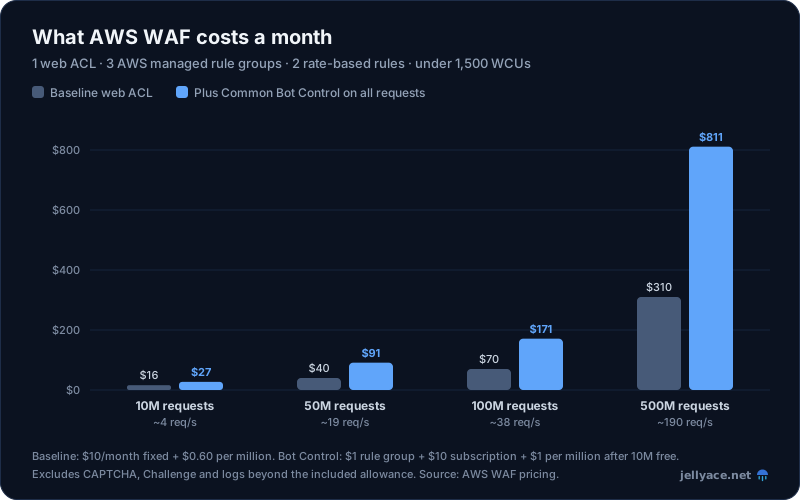
Baseline: one web ACL, three AWS managed rule groups, two rate-based rules, under 1,500 WCUs and default body inspection. Bot Control at the Common level with no scope-down, after the 10 million free requests. Excludes logging beyond the included allowance, CAPTCHA and Challenge. Source: AWS WAF pricing.
The core WAF is cheap; Bot Control roughly doubles the bill at scale, and Fraud Control and Targeted Bot Control can dwarf it. Scope-down statements are the main cost lever. More on keeping AWS bills under control in Cut your AWS bill.
Alternatives that change the maths
- CloudFront flat-rate plans. Launched in November 2025, these CloudFront plans that bundle delivery, WAF and DDoS protection, DNS and log ingestion per distribution for a fixed monthly price with no overages: Free ($0), Pro ($15), Business ($200) and Premium ($1,000). For a small site behind CloudFront, this can be simpler and cheaper than pay-as-you-go WAF. Check which WAF features each tier includes before switching.
- AWS Shield Advanced. $3,000 a month with a one-year commitment, billed once per payer account. It includes WAF web ACL, rule and request fees for protected resources (at the default 1,500 WCUs), DDoS cost protection and access to the Shield Response Team (with Business or Enterprise Support). Bot Control and Fraud Control are still charged. Worth it for large or high-risk applications, not for most.
Best practices
Start every new rule in Count mode. Set managed rule groups to override_action { count {} } and custom rules to action { count {} }, deploy, and watch for a week of real traffic. Then switch to Block one group at a time. This is the single biggest thing that separates a WAF that works from one that gets switched off after it breaks checkout.
Turn on logging and actually read it. Send logs to CloudWatch Logs (easiest to query with Logs Insights), S3 (cheapest to keep) or Amazon Data Firehose (to stream to a security tool). Log group and bucket names must start with aws-waf-logs-. Redact the authorization and cookie headers, and any custom header carrying tokens, so session credentials don't sit in your logs. Logging filters can keep only blocked and counted requests if volume is a concern.
Order rules deliberately. Lower priority numbers run first. A sensible order is: your allow lists (health checks, partner IPs), IP blocks and geo rules, rate-based rules, IP reputation, then the broader managed rule groups, then any custom rules that match on labels from earlier groups. Leave gaps between priorities so you can insert rules later.
Rate limit by IP, and much harder on sensitive paths. A general limit of a few thousand requests per IP per five minutes catches floods without hurting real users. Add separate rules with scope-down statements on /login, password reset, sign-up and expensive search endpoints, with limits in the tens. If clients sit behind a proxy or CDN other than CloudFront, aggregate on the forwarded IP header instead.
Use geo rules where you can justify them. If you only serve the UK and EU, blocking or challenging other countries removes a lot of noise. Prefer Challenge or CAPTCHA over Block if travellers and VPN users matter.
Don't let attackers go around it. WAF only sees traffic that passes through the resource it's attached to. If your ALB has a public DNS name and an open security group, anyone can skip CloudFront and its web ACL. Restrict the ALB's security group to the CloudFront origin-facing managed prefix list and require a secret custom header that CloudFront adds, or use CloudFront VPC origins so the ALB can be internal. The CloudFront and ALB post walks through this.
Alarm on the metrics. WAF publishes AllowedRequests, BlockedRequests, CountedRequests and others to CloudWatch per rule and per web ACL. Alarm on a sudden jump in blocked requests (an attack or a false positive after a deploy) and on blocks from a specific managed rule you've just enabled.
Know what's free. AWS Shield Standard protects every account against common network and transport layer DDoS attacks at no charge, with nothing to enable. WAF adds the application layer on top. For audits, a logged and reviewed WAF configuration is useful evidence for ISO 27001 and SOC 2.
Things to watch
- WCU limits. Every rule and rule group uses capacity, and a web ACL fails to save if it goes over 5,000 WCUs. Above 1,500, every request costs more. Check the WCU total in the console or with
aws wafv2 check-capacitybefore adding another managed rule group. - Body inspection limits. WAF only looks at the first 8 KB of the body on ALB and AppSync, and the first 16 KB by default on CloudFront, API Gateway, Cognito, App Runner and Verified Access (configurable up to 64 KB for a fee). Anything after that is invisible. Body-inspecting rules have an oversize handling setting: Continue (inspect what fits), Match or No match. For APIs that never take large bodies, a size constraint rule that blocks oversized bodies closes the gap.
- CloudFront web ACLs live in
us-east-1. So do their logs, metrics, IP sets and regex sets. Terraform with a singleeu-west-2provider will create a regional web ACL that CloudFront refuses to use. - Managed rule false positives. The most common is
SizeRestrictions_BODYin the Core rule set, which blocks bodies over 8 KB and so breaks file uploads and large JSON payloads. Others:NoUserAgent_HEADERblocks some health checkers and SDKs, andCrossSiteScripting_BODYcan trip on rich text editors. Override the rule to Count, then use its label to block it everywhere except the paths that need it:
rule {
  name     = "block-large-body-except-uploads"
  priority = 25 # after the Core rule set at 20

  action {
    block {}
  }

  statement {
    and_statement {
      statement {
        label_match_statement {
          scope = "LABEL"
          key   = "awswaf:managed:aws:core-rule-set:SizeRestrictions_Body"
        }
      }
      statement {
        not_statement {
          statement {
            byte_match_statement {
              search_string         = "/uploads/"
              positional_constraint = "STARTS_WITH"
              field_to_match {
                uri_path {}
              }
              text_transformation {
                priority = 0
                type     = "NONE"
              }
            }
          }
        }
      }
    }
  }

  visibility_config {
    cloudwatch_metrics_enabled = true
    metric_name                = "block-large-body-except-uploads"
    sampled_requests_enabled   = true
  }
}- Managed rule groups change under you. By default you get AWS's latest version automatically. For production, consider pinning a
versioninmanaged_rule_group_statement, testing new versions in staging, and upgrading deliberately. Pinned versions eventually expire, so put a reminder in your calendar or subscribe to the rule group's SNS update notifications. - One web ACL per resource. Associating a second web ACL replaces the first. If two teams manage WAF for the same ALB in different Terraform stacks, they will overwrite each other.
- Bot Control and Fraud Control need tokens. Targeted Bot Control and Fraud Control work best when your front end uses the AWS WAF JavaScript or mobile SDK to get tokens. Without it, many detections can't fire, and API-only clients may get challenged.
Getting started
Create one web ACL with the IP reputation list, Core rule set and Known bad inputs, a general rate limit per IP and a tighter one on login. Turn on logging with auth headers redacted, run everything in Count for a week, fix the false positives with label-based exceptions, then switch to Block. Put it on CloudFront if you have it, and lock the origin down so nobody can go around it. For most applications, that's $16 to $70 a month for protection that removes most automated attacks before they reach your code.