Amazon CloudFront in practice: S3, private load balancers, caching and costs
How to put CloudFront in front of S3, an Application Load Balancer and APIs: locking origins down, path-based behaviours, what to cache and what never to cache, edge functions, a Terraform example, and what it costs on pay-as-you-go and flat-rate plans.
Amazon CloudFront is AWS's content delivery network (CDN). Viewers connect to the nearest of hundreds of edge locations; CloudFront answers from its cache if it can, and otherwise forwards the request to your origin over AWS's network on a connection it keeps open.
That makes it worth putting in front of almost any public web application on AWS, not only static files:
- Speed. TLS ends close to the viewer, and cached responses never travel to your Region at all.
- Less load and a smaller bill at the origin. Every cache hit is a request your S3 bucket, load balancer or containers don't serve. Data transferred from AWS origins to CloudFront is free.
- One front door. One domain, one certificate, AWS WAF and DDoS protection in one place, and origins that aren't reachable from the internet at all.
The part that takes thought is caching: deciding what CloudFront may store, for how long, and for whom. Get it wrong one way and you've added a hop for nothing; get it wrong the other way and one user sees another user's page.
The shape of a typical setup
One distribution, several origins, and cache behaviours that route requests by path. CloudFront checks the path patterns in order, and the default behaviour (*) catches whatever is left:
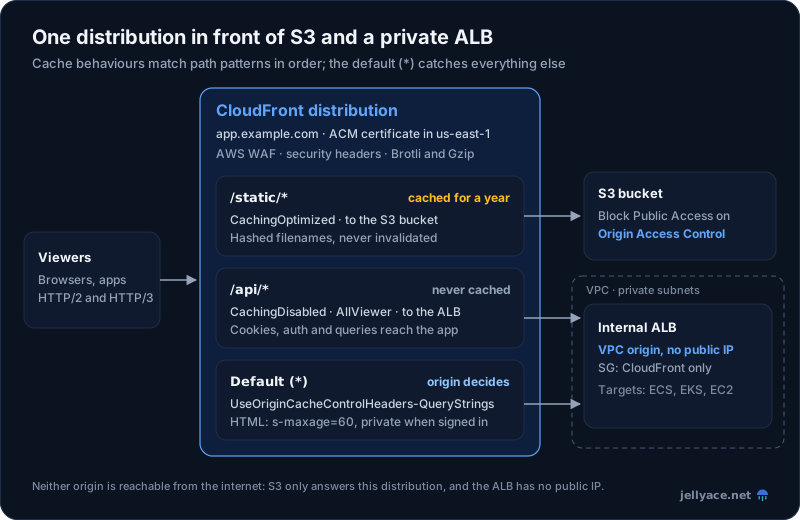
Neither origin can be reached directly: the bucket only answers this distribution, and the load balancer has no public IP address.
| Behaviour | Origin | Cache policy | Origin request policy |
|---|---|---|---|
/static/* |
S3 bucket | CachingOptimized |
None |
/api/* |
Application Load Balancer | CachingDisabled |
AllViewer |
Default (*) |
Application Load Balancer | UseOriginCacheControlHeaders-QueryStrings |
AllViewer |
Origins, and how to lock each one down
An origin that is still reachable directly lets anyone skip your WAF rules, rate limits and caching. Each origin type has its own way of accepting traffic only from CloudFront.
S3 with Origin Access Control
Keep the bucket private, with Block Public Access on, and use Origin Access Control (OAC). CloudFront signs each request to S3 with SigV4, and the bucket policy allows the CloudFront service principal, but only for your distribution:
{
  "Effect": "Allow",
  "Principal": { "Service": "cloudfront.amazonaws.com" },
  "Action": "s3:GetObject",
  "Resource": "arn:aws:s3:::app-assets/*",
  "Condition": {
    "StringEquals": { "AWS:SourceArn": "arn:aws:cloudfront::123456789012:distribution/E2EXAMPLE" }
  }
}
Don't use the legacy origin access identity (OAI) in new setups. OAC works in every Region, supports buckets encrypted with AWS Key Management Service (SSE-KMS) and allows PUT and DELETE; OAI does none of those without workarounds. Two details:
- Point the origin at the bucket's REST endpoint, not the S3 static website endpoint. A website endpoint is treated as a custom origin and can't use OAC, so you'd have to make the bucket public.
- Without
s3:ListBucketin the policy, S3 returns403 Forbiddenfor a missing object rather than404. Either grant it or map 403 to your not-found page.
Application Load Balancer: make it private
VPC origins, launched in November 2024, are now the best option. You put an internal Application Load Balancer (ALB) in private subnets and register it as a VPC origin. CloudFront reaches it through a network interface it manages in your subnet, so the ALB has no public IP address at all. There's no extra charge, and since early November 2025 the ALB can be in a different AWS account from the distribution.
The ALB's security group still needs a rule that admits CloudFront: either the CloudFront managed prefix list (com.amazonaws.global.cloudfront.origin-facing) or, more tightly, the CloudFront-VPCOrigins-Service-SG security group that CloudFront creates for you. The VPC also needs an internet gateway attached, even though traffic to the origin doesn't use it.
If the ALB has to stay public, for example because something else calls it directly, lock it down in two layers:
- Network: allow inbound traffic only from the CloudFront managed prefix list. This stops anyone who isn't CloudFront, but any CloudFront distribution, including someone else's, could still reach you.
- Application: have CloudFront add a secret custom header to origin requests (for example
X-Origin-Verifywith a random value), and give the ALB listener a rule that forwards only requests carrying that value and returns403for everything else. Rotate the value like any other secret.
API Gateway, Lambda function URLs and other HTTP origins
- API Gateway: use a regional endpoint. An edge-optimized endpoint already sits behind a CloudFront distribution that AWS manages, so putting yours in front adds a second CDN hop. Use the
AllViewerExceptHostHeaderorigin request policy, because API Gateway expects its own hostname in theHostheader. To stop direct calls, have CloudFront add a secret header and check it with AWS WAF on the API, or add an API key as thex-api-keyheader on REST APIs. - Lambda function URLs: set the function URL's auth type to
AWS_IAMand use OAC, which signs requests for you. Also useAllViewerExceptHostHeader. The catch: forPOSTandPUT, Lambda doesn't accept unsigned payloads, so clients must send a SHA-256 hash of the body in thex-amz-content-sha256header. - Anything else on HTTPS (EC2 instances, other clouds, on-premises): use the prefix list in a firewall or security group where you can, plus the secret header.
What to cache, and what not to
This is the decision that matters most:
| Content | Cache? | Origin sends | CloudFront setup |
|---|---|---|---|
JS, CSS, fonts and images with a content hash in the name (app.3f9a2c.js) |
Yes, for a year | Cache-Control: public, max-age=31536000, immutable |
CachingOptimized |
| Images and files without a hash | Yes, for hours to a day | Cache-Control: public, max-age=3600 |
CachingOptimized |
| HTML pages that are the same for everyone | Briefly | Cache-Control: public, max-age=0, s-maxage=60, stale-while-revalidate=60 |
UseOriginCacheControlHeaders |
| Public, read-only API responses (a product catalogue) | Carefully, for seconds to minutes | Cache-Control: public, s-maxage=30 |
Cache key with exactly the query strings that change the response |
| Anything personalised or behind a login | No | Cache-Control: private, no-store |
CachingDisabled |
POST, PUT, PATCH, DELETE |
Never cached | Allowed methods include them; only GET and HEAD are cached |
|
| Any response that sets a cookie | No | Cache-Control: private, no-store |
Three rules underneath that table:
Let the origin decide, with Cache-Control. s-maxage applies only to shared caches such as CloudFront, and max-age to browsers too. That lets HTML sit at the edge for 60 seconds while browsers revalidate on every visit. CloudFront also supports stale-while-revalidate and stale-if-error, so it can serve a slightly old page while it fetches a new one, or while your origin is down.
Never cache a response that sets a cookie. If cookies are forwarded and the response is cacheable, CloudFront caches the Set-Cookie header with the object and sends it to every viewer who gets a cache hit. That is how one visitor ends up logged in as another. Any response that sets a cookie should be private, no-store, and session endpoints belong under a CachingDisabled behaviour.
Version filenames; don't rely on invalidations. A build tool that puts a content hash in each asset's filename gives every release new URLs, so assets can be cached for a year and never invalidated. Deploy in order: upload new assets first, then the HTML that references them. Then invalidate only the few unversioned paths, such as /index.html, or /* (one path, however many files it clears). Invalidation is fast, taking effect in under 5 seconds at the 95th percentile according to AWS. Still, every invalidation is a deploy step that can fail or be forgotten. If you deploy from CI, see GitHub Actions to AWS with OIDC for giving the pipeline a short-lived role that can upload to the bucket and create invalidations.
Cache policies, origin request policies and the cache key
CloudFront splits two questions that are easy to confuse:
- A cache policy sets the TTLs and the cache key: the values that make two requests count as different objects. That's always the URL path, plus whichever headers, cookies and query strings you add.
- An origin request policy sets what is forwarded to the origin on a cache miss, without adding it to the cache key.
Everything in the cache key multiplies the number of copies CloudFront stores. Include all cookies, and a page that's identical for everyone gets a separate cache entry for every visitor, because analytics cookies are different for everyone, and your hit ratio drops towards zero. So keep the cache key to what actually changes the response, and send everything else your application needs with the origin request policy.
The managed policies cover most needs:
| Managed policy | Type | What it does | Use for |
|---|---|---|---|
CachingOptimized |
Cache | Default TTL 24 hours, maximum one year, minimum 1 second. No cookies, query strings or headers in the key, apart from normalised Accept-Encoding |
Static assets |
CachingDisabled |
Cache | TTLs of 0, nothing cached | APIs and personalised paths |
UseOriginCacheControlHeaders |
Cache | Caches only what the origin's Cache-Control allows; default TTL 0. Host, Origin and all cookies in the key |
Server-rendered sites and CMSs |
UseOriginCacheControlHeaders-QueryStrings |
Cache | As above, with all query strings in the key | The same, when query strings change the page |
AllViewer |
Origin request | Forwards all headers, cookies and query strings | ALBs and custom origins |
AllViewerExceptHostHeader |
Origin request | The same, without the viewer's Host header |
API Gateway and Lambda function URLs |
CORS-S3Origin |
Origin request | Forwards the CORS request headers | S3 buckets serving fonts or files to other domains |
One trap: CachingOptimized has a minimum TTL of 1 second, and when the minimum TTL is above 0, CloudFront caches responses even if they say no-store or private. One second is enough to serve one user's account page to another. Never attach it to a dynamic path.
The UseOriginCacheControlHeaders policies are the reverse case: they put all cookies in the cache key. If your public pages carry analytics or consent cookies, every visitor gets a separate cache entry. Create a custom cache policy that keeps the same TTLs but includes only the cookies that actually change the page.
CachingDisabled doesn't forward anything on its own, so pair it with an origin request policy such as AllViewer, or your API won't receive cookies, query strings or the Authorization header.
CloudFront Functions or Lambda@Edge
Both run your code at the edge. Reach for CloudFront Functions first:
| CloudFront Functions | Lambda@Edge | |
|---|---|---|
| Language | JavaScript | Node.js and Python |
| Runs on | Viewer request and viewer response | Viewer and origin, request and response |
| Duration | Under a millisecond | Up to 30 seconds on origin events |
| Memory and code size | 2 MB, 10 KB of code | 128 MB on viewer events, up to 10 GB on origin events; 50 MB of code |
| Network calls, request body | No | Yes |
| Price | $0.10 per million invocations, first 2 million a month free | $0.60 per million requests plus $0.00005001 per GB-second, no free tier |
For 50 million requests a month, a CloudFront Function costs $4.80. A Lambda@Edge function costs $30 in requests alone, or $31.56 with 5 milliseconds of run time at 128 MB.
The classic job for a CloudFront Function is making a static site in S3 serve index.html for "pretty" URLs, because the S3 REST endpoint doesn't do that by itself:
// Viewer request, JavaScript runtime 2.0
async function handler(event) {
  const request = event.request;
  const uri = request.uri;

  if (uri.endsWith("/")) {
    request.uri += "index.html"; // /docs/ -> /docs/index.html
  } else if (!uri.includes(".")) {
    request.uri += "/index.html"; // /docs -> /docs/index.html
  }
  return request;
}
Other good uses: redirects, adding or normalising headers to keep the cache key small, simple A/B test assignment, and validating a signed token. Keep Lambda@Edge for work that needs the network, the request body or a library, such as image resizing or checking a session against a database. Lambda@Edge functions must be created in US East (N. Virginia), and you deploy a numbered version, not $LATEST.
Compression, HTTP/3, TLS and your domain
- Compression: turn on "compress objects automatically" on every behaviour. CloudFront then serves Brotli or Gzip, depending on what the browser accepts, for objects between 1,000 bytes and 10 MB. Brotli works only with cache policies, not legacy cache settings, and the origin must send a
Content-Lengthheader or CloudFront won't compress. - HTTP/3: set the distribution's HTTP versions to HTTP/2 and HTTP/3. It costs nothing, and browsers that don't support it fall back to HTTP/2.
- Certificate: request the AWS Certificate Manager (ACM) certificate for your domain in us-east-1, whatever Region your application runs in. That's the only Region CloudFront reads viewer certificates from. Certificates for the ALB behind it can be in the ALB's own Region.
- Domain: add the domain as an alternate domain name on the distribution, then point DNS at it with a Route 53 alias record, which also works at the zone apex (
example.com). Use SNI, the default. The legacy dedicated-IP option costs $600 a month and almost nobody needs it. - Minimum TLS: use the
TLSv1.2_2021security policy for viewers.
Security headers
A response headers policy adds headers to every response without touching your application. The managed SecurityHeadersPolicy sets Strict-Transport-Security (one year), X-Content-Type-Options: nosniff, X-Frame-Options: SAMEORIGIN and Referrer-Policy: strict-origin-when-cross-origin. If the origin already sends one of these, its value wins, except X-Content-Type-Options. For a Content Security Policy, create your own response headers policy, since a CSP is specific to each site.
Origin Shield
Without it, each of CloudFront's regional edge caches fetches from your origin separately on a miss. Origin Shield adds one more cache layer in a Region you choose, close to your origin, so every miss goes through one place. It earns its keep when many regions request the same content and the origin is expensive to hit: video, on-the-fly image processing, or a slow CMS. It charges per request that reaches it, $0.0075 per 10,000 in the US and $0.009 in Europe. Requests made in the same Region as your origin bypass it. For a typical web application with long-lived hashed assets, you don't need it.
A Terraform example
The setup from the diagram, with an internal ALB as a VPC origin. It assumes the bucket, the internal ALB (aws_lb.app), its security group and the ACM certificate's DNS validation are defined elsewhere:
provider "aws" {
  alias  = "us_east_1"
  region = "us-east-1"
}

# Viewer certificates must live in us-east-1
resource "aws_acm_certificate" "app" {
  provider          = aws.us_east_1
  domain_name       = "app.example.com"
  validation_method = "DNS"
}

data "aws_cloudfront_cache_policy" "optimized" {
  name = "Managed-CachingOptimized"
}

data "aws_cloudfront_cache_policy" "disabled" {
  name = "Managed-CachingDisabled"
}

data "aws_cloudfront_cache_policy" "origin_headers" {
  name = "UseOriginCacheControlHeaders-QueryStrings"
}

data "aws_cloudfront_origin_request_policy" "all_viewer" {
  name = "Managed-AllViewer"
}

data "aws_cloudfront_response_headers_policy" "security" {
  name = "Managed-SecurityHeadersPolicy"
}

resource "aws_cloudfront_origin_access_control" "assets" {
  name                              = "app-assets"
  origin_access_control_origin_type = "s3"
  signing_behavior                  = "always"
  signing_protocol                  = "sigv4"
}

resource "aws_cloudfront_vpc_origin" "app" {
  vpc_origin_endpoint_config {
    name                   = "app-alb"
    arn                    = aws_lb.app.arn # internal = true, private subnets
    http_port              = 80
    https_port             = 443
    origin_protocol_policy = "http-only"

    origin_ssl_protocols {
      items    = ["TLSv1.2"]
      quantity = 1
    }
  }
}

# Let CloudFront, and only CloudFront, reach the ALB
data "aws_ec2_managed_prefix_list" "cloudfront" {
  name = "com.amazonaws.global.cloudfront.origin-facing"
}

resource "aws_vpc_security_group_ingress_rule" "alb_from_cloudfront" {
  security_group_id = aws_security_group.alb.id
  prefix_list_id    = data.aws_ec2_managed_prefix_list.cloudfront.id
  ip_protocol       = "tcp"
  from_port         = 80
  to_port           = 80
}

locals {
  all_methods = ["GET", "HEAD", "OPTIONS", "PUT", "POST", "PATCH", "DELETE"]
}

resource "aws_cloudfront_distribution" "app" {
  enabled         = true
  aliases         = ["app.example.com"]
  http_version    = "http2and3"
  is_ipv6_enabled = true
  price_class     = "PriceClass_All"

  origin {
    origin_id                = "assets"
    domain_name              = aws_s3_bucket.assets.bucket_regional_domain_name
    origin_access_control_id = aws_cloudfront_origin_access_control.assets.id
  }

  origin {
    origin_id   = "app"
    domain_name = aws_lb.app.dns_name

    vpc_origin_config {
      vpc_origin_id = aws_cloudfront_vpc_origin.app.id
    }
  }

  # Hashed assets from S3, cached for up to a year
  ordered_cache_behavior {
    path_pattern               = "/static/*"
    target_origin_id           = "assets"
    viewer_protocol_policy     = "redirect-to-https"
    allowed_methods            = ["GET", "HEAD"]
    cached_methods             = ["GET", "HEAD"]
    compress                   = true
    cache_policy_id            = data.aws_cloudfront_cache_policy.optimized.id
    response_headers_policy_id = data.aws_cloudfront_response_headers_policy.security.id
  }

  # The API: never cached, everything forwarded
  ordered_cache_behavior {
    path_pattern               = "/api/*"
    target_origin_id           = "app"
    viewer_protocol_policy     = "https-only"
    allowed_methods            = local.all_methods
    cached_methods             = ["GET", "HEAD"]
    compress                   = true
    cache_policy_id            = data.aws_cloudfront_cache_policy.disabled.id
    origin_request_policy_id   = data.aws_cloudfront_origin_request_policy.all_viewer.id
    response_headers_policy_id = data.aws_cloudfront_response_headers_policy.security.id
  }

  # Pages: cached only when the app sends Cache-Control saying so
  default_cache_behavior {
    target_origin_id           = "app"
    viewer_protocol_policy     = "redirect-to-https"
    allowed_methods            = local.all_methods
    cached_methods             = ["GET", "HEAD"]
    compress                   = true
    cache_policy_id            = data.aws_cloudfront_cache_policy.origin_headers.id
    origin_request_policy_id   = data.aws_cloudfront_origin_request_policy.all_viewer.id
    response_headers_policy_id = data.aws_cloudfront_response_headers_policy.security.id
  }

  viewer_certificate {
    acm_certificate_arn      = aws_acm_certificate_validation.app.certificate_arn
    ssl_support_method       = "sni-only"
    minimum_protocol_version = "TLSv1.2_2021"
  }

  restrictions {
    geo_restriction {
      restriction_type = "none"
    }
  }
}

# The bucket answers this distribution only
data "aws_iam_policy_document" "assets" {
  statement {
    actions   = ["s3:GetObject"]
    resources = ["${aws_s3_bucket.assets.arn}/*"]

    principals {
      type        = "Service"
      identifiers = ["cloudfront.amazonaws.com"]
    }

    condition {
      test     = "StringEquals"
      variable = "AWS:SourceArn"
      values   = [aws_cloudfront_distribution.app.arn]
    }
  }
}

resource "aws_s3_bucket_policy" "assets" {
  bucket = aws_s3_bucket.assets.id
  policy = data.aws_iam_policy_document.assets.json
}
Some notes on it:
- CloudFront forwards the full path, so a request for
/static/app.3f9a2c.jsfetches the keystatic/app.3f9a2c.js. Upload assets under astatic/prefix. - This example uses plain HTTP between CloudFront and the internal ALB. If your policy requires encryption on that hop too, use
https-only, and give the ALB a certificate that matches the origin's domain name. - Attach an AWS WAF web ACL with
web_acl_id. Requests that WAF blocks incur no CloudFront request or data transfer charges, though WAF still bills for evaluating them. - Running ECS or EKS behind that ALB? ECS or EKS for startups covers the choice.
What it costs
CloudFront now offers two pricing models: the original pay-as-you-go pricing, and flat-rate plans, launched on 18 November 2025.
Pay-as-you-go
The always-free tier covers, each month, 1 TB of data transfer out, 10 million HTTP or HTTPS requests and 2 million CloudFront Function invocations. After that, you pay mainly for data transfer to viewers and for requests, at prices that depend on where the viewer is:
| Viewers in | Data transfer, per GB (next 9 TB) | HTTPS requests, per 10,000 |
|---|---|---|
| United States, Mexico, Canada | $0.085 | $0.0100 |
| Europe, Israel, Türkiye | $0.085 | $0.0120 |
| South Africa, Kenya, Nigeria, Egypt, Middle East | $0.110 | $0.0120 |
| South America | $0.110 | $0.0220 |
| Japan | $0.114 | $0.0120 |
| Australia, New Zealand | $0.114 | $0.0125 |
| Hong Kong, Singapore, South Korea, Taiwan and the rest of Southeast Asia | $0.120 | $0.0120 |
| India | $0.109 | $0.0120 |
Prices fall with volume. In the US and Europe, data transfer drops to $0.080 per GB after 10 TB and $0.060 after 50 TB. The other charges:
- Origin fetches from AWS origins (S3, ALB, EC2, including VPC origins): free.
- Data CloudFront sends to your origin (request bodies on
POSTandPUT): $0.020 per GB in the US and Europe. - Invalidations: the first 1,000 paths a month are free across the account, then $0.005 per path. A wildcard such as
/*counts as one path. - Origin Shield: $0.0075 per 10,000 requests in US Regions, $0.009 in Europe.
- Price classes let you stop serving from the most expensive locations.
PriceClass_100uses only North America and Europe edge locations: cheaper, and slower for everyone else.
Compare that with serving straight from S3 or an ALB in US East (N. Virginia), where data transfer to the internet costs $0.09 per GB for the first 10 TB, after a 100 GB monthly free tier shared across AWS services. CloudFront's per-GB price is a little lower, its free tier is ten times larger, and its requests cost more than S3's ($0.0100 against $0.004 per 10,000 for S3 GET requests).
Flat-rate plans
Flat-rate plans charge one monthly price per distribution, with no overage charges. Each plan bundles CloudFront with AWS WAF, DDoS protection, Route 53 DNS for the domain, CloudWatch Logs ingestion for access logs, a TLS certificate, CloudFront Functions, and monthly S3 storage credits:
| Plan | Price per month | Requests included | Data transfer included | Notable additions |
|---|---|---|---|---|
| Free | $0 | 1 million | 100 GB | WAF with 5 rules |
| Pro | $15 | 10 million | 50 TB | Access logs, WAF with 25 rules |
| Business | $200 | 125 million | 50 TB | Custom cache policies, VPC origins, bot control, uptime SLA |
| Premium | $1,000 | 500 million | 50 TB | Origin Shield, origin failover |
The allowances aren't hard limits. Requests blocked by WAF or DDoS protection don't count towards them, and AWS allows a one-off spike of up to three times the allowance in a month. If usage stays well above the allowance for months, AWS may serve your traffic from fewer locations rather than charge you more.
Plans have limits: no origin access identity, legacy cache settings, real-time logs or continuous deployment. Lambda@Edge is still billed separately. At the time of writing, you subscribe to a plan in the CloudFront console, not through the API or Terraform, though the distribution itself can still be managed in Terraform.
What you save
Here's the monthly cost of delivering the same traffic three ways:
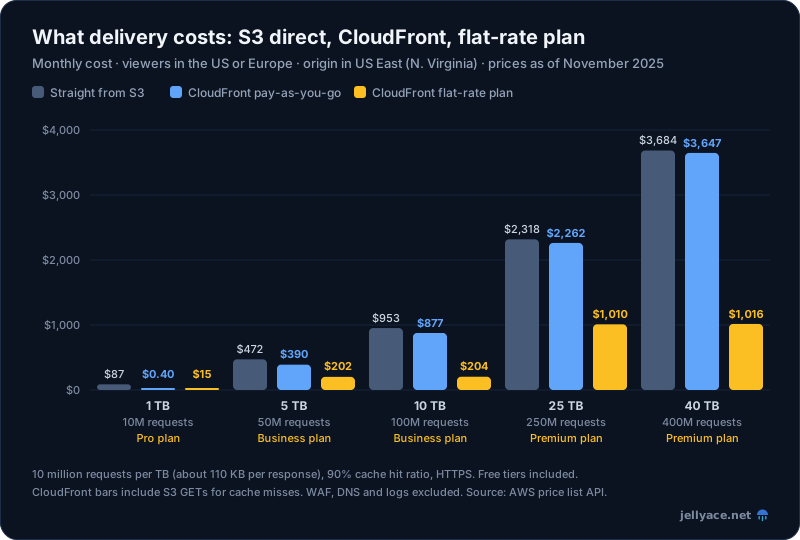
Viewers in the US or Europe, origin in US East (N. Virginia), HTTPS, 10 million requests per TB (about 110 KB per response), 90% cache hit ratio. Free tiers included. CloudFront bars include S3 GET requests for cache misses. WAF, DNS and logging excluded, though the flat-rate plans include them. Prices from the AWS price list as of November 2025.
What the numbers say:
- Under 1 TB and 10 million requests a month, pay-as-you-go CloudFront is effectively free, against $87 a month to serve the same traffic directly. For small sites, there's no cost reason not to use it.
- On pay-as-you-go, the saving narrows as traffic grows, from 17% at 5 TB to 1% at 40 TB. Above the free tier, CloudFront's lower bandwidth price ($0.085 against $0.09 per GB) and higher request price nearly cancel out. The real saving at scale is at the origin: fewer requests to your ALB, containers and database.
- Flat-rate plans change the picture for anyone whose traffic fits an allowance: $204 instead of $877 at 10 TB, with WAF included. Choose a plan by its request allowance, since that's usually the one you reach first.
For more ways to trim the rest of the bill, see cutting your AWS bill.
Things to watch
- Custom error responses apply to the whole distribution. The common single-page app trick of mapping 403 and 404 to
/index.htmlwith a 200 status also turns every missing API route into an HTML page with a 200 status. Use a CloudFront Function on the static behaviour to rewrite routes instead. - Errors are cached too. CloudFront caches 4xx and 5xx responses for 10 seconds by default, or longer if the error carries a
Cache-Controlheader. Make sure your error pages don't send a longmax-age. - Small objects can make CloudFront more expensive. At about 11 KB per response, 10 TB is roughly a billion requests: $1,813 a month through CloudFront on pay-as-you-go, against $1,313 straight from S3. For chatty APIs with tiny responses, the request price dominates, so check the numbers or look at a flat-rate plan.
- The prefix list is big. The CloudFront managed prefix list counts as 55 rules against your security group's rule quota, so give it a security group of its own.
- VPC origins have gaps. They don't support Lambda@Edge origin-request or origin-response triggers, or gRPC. Check before you migrate.
- Forwarding
Hostto an HTTPS origin means the origin's certificate must match your viewer's domain, not the origin's own hostname. That's fine for an ALB with your domain's certificate; it breaks API Gateway and Lambda function URLs, which is why they useAllViewerExceptHostHeader. - The free tier is per account, not per distribution, and so is the allowance of 1,000 free invalidation paths.
- Changes take minutes to deploy. A distribution update propagates to every edge location before its status returns to "Deployed". Plan releases around that, and keep invalidations out of the critical path.
Getting started
Put CloudFront in front of everything public, and lock every origin to it: OAC for S3, a VPC origin for the ALB, OAC for Lambda function URLs. Cache hashed static assets for a year, let your application set Cache-Control on everything else, and disable caching on APIs and anything personal. Keep the cache key small, prefer CloudFront Functions to Lambda@Edge, and before your traffic grows, compare pay-as-you-go with a flat-rate plan.