Renovate: keeping dependencies up to date without the busywork
How Renovate turns dependency updates into small, tested pull requests: a sensible config, automerge you can trust, waiting out risky new releases, and fixing the lock file errors that trip people up.
Dependencies rarely break a project in one go. They drift. Nobody updates them for a year, then a security fix lands in a version three majors ahead, and a one-line patch turns into a week of upgrades.
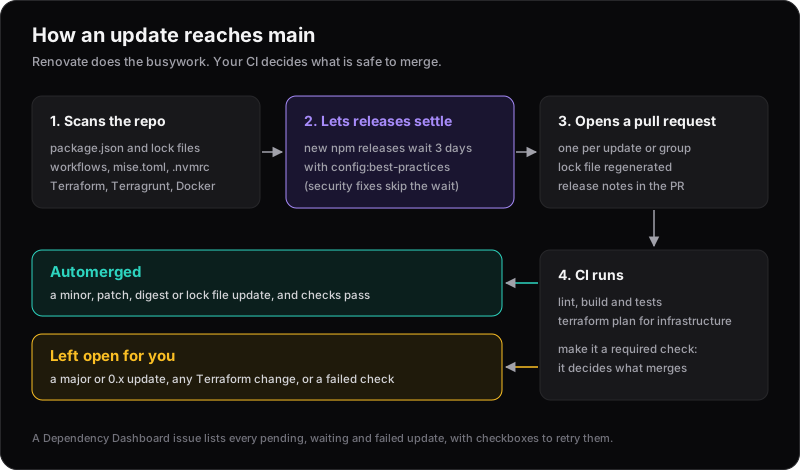
Renovate prevents the drift. It watches every dependency in a repository and opens a small pull request each time one has a new release. If your CI passes and the update is low risk, it can merge the pull request on its own. Everything else waits for you, with the release notes attached.
What it updates
Renovate is open source and understands far more than package.json. In a typical web project it updates:
- npm packages, including the lock file
- GitHub Actions in
.github/workflows - Node.js in
.nvmrc, and Node and other tools inmise.toml - Docker images in Dockerfiles and Compose files
- Terraform and Terragrunt: providers, modules and the lock file (more on this below)
- Helm charts, Kubernetes manifests and dozens of other formats
It also works on GitLab, Bitbucket, Azure DevOps, Gitea and Forgejo, not just GitHub.
Getting started
On GitHub, the quickest route is the Mend Renovate app. Its Community plan is free for all repositories. You can also self-host Renovate with its Docker image or the renovatebot/github-action.
Once installed, Renovate opens an onboarding pull request called Configure Renovate. It adds a renovate.json and lists the updates it would make, so you can check them before merging.
The onboarding config is a single preset:
{
  "$schema": "https://docs.renovatebot.com/renovate-schema.json",
  "extends": ["config:recommended"]
}
config:recommended is a good start. Among other things, it:
- Opens a Dependency Dashboard, an issue that lists every pending, waiting and failed update. Each has a checkbox to create, retry or rebase it.
- Groups packages from the same monorepo into one pull request.
- Adds Merge Confidence badges, which show how old a release is and how many other projects have adopted it.
Renovate also limits itself to two new pull requests an hour and ten open at once, so the first week isn't a flood.
Why the preset matters
Leave out config:recommended and a Next.js patch release arrives as two separate pull requests: one for next and one for eslint-config-next. They're released together and should be tested together. With config:recommended, both arrive as a single "update nextjs monorepo" pull request.
A config worth copying
For a small application, this is what we'd start with:
{
  "$schema": "https://docs.renovatebot.com/renovate-schema.json",
  "extends": ["config:best-practices"],
  "semanticCommits": "enabled",
  "lockFileMaintenance": {
    "enabled": true,
    "schedule": ["* 0-3 * * 1"],
    "automerge": true
  },
  "packageRules": [
    {
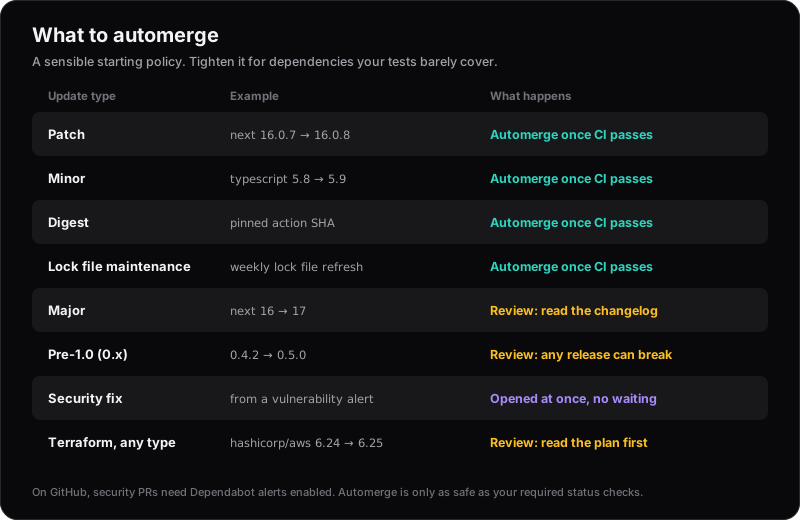
      "description": "Automerge non-major updates once CI passes",
      "matchUpdateTypes": ["minor", "patch", "digest"],
      "matchCurrentVersion": "!/^0/",
      "automerge": true
    },
    {
      "description": "Use the ci commit type for workflow updates",
      "matchFileNames": [".github/workflows/**"],
      "semanticCommitType": "ci"
    }
  ]
}
Save it as renovate.json in the repository root, or as .github/renovate.json to keep the root tidy. Check it with Renovate's validator before you push:
npx --yes --package renovate -- renovate-config-validator
What config:best-practices adds
config:best-practices is config:recommended plus a few stricter defaults from the Renovate maintainers:
- Pins GitHub Actions to commit SHAs, with the version kept as a comment. Tags can be moved; a SHA can't. Renovate keeps the SHAs current, so pinning costs nothing.
- Pins Docker images to digests, for the same reason.
- Pins development dependencies to exact versions.
- Waits three days before proposing a new npm release. More on this below.
Expect a handful of "pin" pull requests on the first run. After that, it's quiet.
What the rules do
matchUpdateTypesdecides which updates automerge. Patch, minor and digest updates shouldn't break anything if the package follows semantic versioning. Majors stay open for review.matchCurrentVersion: "!/^0/"excludes packages still on 0.x, where any release can break your code.lockFileMaintenancerebuilds the lock file every Monday before 4am (UTC), picking up updates to transitive dependencies. Renovate's maintainers consider it the lowest-risk update of all, so it automerges too.semanticCommitsgives every commit a conventional prefix, such asfix(deps):orchore(deps):, and the second rule usescifor workflow changes.
Update (October 2026): Since Renovate 43 (January 2026), config:best-practices refreshes the lock file every Monday morning by itself. Keep "automerge": true under lockFileMaintenance, but you can drop enabled and schedule.
Automerge is only as safe as your CI
Renovate never merges until your status checks pass, so automerge is safe only if the checks mean something. Before you turn it on:
- Have a test workflow that runs on pull requests. At a minimum, install with
npm ci, then lint and build. A build catches most breaking changes in a static site or small app. - Make it a required status check in your branch protection rules or ruleset.
- Turn on "Allow auto-merge" in the repository settings. Renovate then uses GitHub's native auto-merge, which is faster.
If your branch requires an approving review, Renovate can't merge its own pull requests. Either let it bypass the review requirement, or keep automerge off and merge by hand.
Waiting out risky releases
In September 2025, a phished maintainer's account was used to publish malicious versions of chalk and debug, packages with billions of weekly downloads. Days later, the Shai-Hulud worm spread through hundreds of npm packages. In both cases, the bad versions were found and removed within days.
An update bot that installs every release within minutes makes this worse. minimumReleaseAge makes Renovate wait. With config:best-practices, new npm releases wait three days before Renovate proposes them; until then, the branch has a pending renovate/stability-days check. You can set it for other sources too, such as GitHub Actions:
{
  "packageRules": [
    {
      "matchDatasources": ["github-tags", "github-releases"],
      "minimumReleaseAge": "3 days"
    }
  ]
}
It only works where the source publishes release dates. Docker Hub does; most other container registries don't, and by default Renovate holds back an update it can't date.
Security fixes from vulnerability alerts skip the wait and are opened immediately. On GitHub, that needs the dependency graph and Dependabot alerts turned on in the repository settings.
Keeping the noise down
A few options make Renovate fit around your team instead of the other way round:
schedulelimits when Renovate opens pull requests, using cron syntax. For example,"schedule": ["* 0-3 * * 1"]means Monday before 4am. Settimezonetoo, or it uses UTC.groupNamecombines related packages, such as all of your@aws-sdk/*clients, into one pull request.automergeType: "branch"merges passing updates without opening a pull request at all. Your test workflow must also run onrenovate/**branches, and it doesn't work if your main branch requires pull requests.
Start with automerge and grouping before reaching for a schedule. An update that merges itself in ten minutes is less disruptive than a batch every Monday.
Renovate with Terraform
Infrastructure code drifts too, and it's riskier: a provider that's a year behind turns a routine change into an upgrade project. Renovate reads *.tf files out of the box. Take this example:
terraform {
  required_version = ">= 1.9.0"

  required_providers {
    aws = {
      source  = "hashicorp/aws"
      version = "~> 5.0"
    }
    random = {
      source  = "hashicorp/random"
      version = "3.6.0"
    }
  }
}

module "vpc" {
  source  = "terraform-aws-modules/vpc/aws"
  version = "5.21.0"
}

module "labels" {
  source = "git::https://github.com/cloudposse/terraform-null-label.git?ref=0.25.0"
}
This is what Renovate does with each line:
| Dependency | Written as | Renovate's pull request |
|---|---|---|
| AWS provider | ~> 5.0 |
Two PRs: one updates .terraform.lock.hcl to the newest 5.x and leaves the code alone; a separate one changes the range to ~> 6.0 |
| Random provider | 3.6.0 |
Bumps the exact version |
| VPC module | version = "5.21.0" |
Bumps the version, with majors in their own PR |
| Git module | ?ref=0.25.0 |
Bumps the tag |
| Terraform itself | >= 1.9.0 |
Nothing: newer versions already match. Pin it in .terraform-version and Renovate updates that file instead |
It also updates helm_release chart versions, container images in kubernetes_* and docker_* resources, and TFLint plugins in .tflint.hcl.
The lock file
Commit .terraform.lock.hcl. Renovate only updates a lock file that already exists; it never creates one.
It also doesn't run terraform init to update it. Renovate downloads the provider's published checksums and builds itself, then writes hashes for every platform the provider publishes. A lock file created on a Mac usually holds a full hash for macOS only, which is why CI on Linux sometimes fails with a checksum error. After Renovate's first provider update, every platform is covered, so expect a bigger diff the first time.
Terragrunt
Renovate updates module sources in terragrunt.hcl too, both registry (tfr:///) and Git (?ref=) sources pinned to a version. When the same module is used in a .tf file and in Terragrunt, both are updated in a single pull request.
Terragrunt lock files are different. Renovate refreshes them only during lock file maintenance, not with each module update, so keep the weekly lockFileMaintenance from the config above.
Rules for infrastructure
A passing build tells you less here: terraform validate won't catch a provider that changes how a resource behaves. Run terraform plan on Renovate's pull requests, and add these rules:
{
  "packageRules": [
    {
      "description": "Group non-major AWS provider updates",
      "matchDatasources": ["terraform-provider"],
      "matchPackageNames": ["hashicorp/aws"],
      "matchUpdateTypes": ["minor", "patch"],
      "groupName": "AWS provider"
    },
    {
      "description": "Infrastructure needs a plan review before merging",
      "matchManagers": ["terraform", "terragrunt"],
      "automerge": false
    },
    {
      "description": "Wait a week before taking new providers and modules",
      "matchDatasources": ["terraform-provider", "terraform-module"],
      "minimumReleaseAge": "7 days"
    }
  ]
}
Put them after the automerge rule in packageRules; later rules win.
- Grouping matters because the AWS provider releases about once a week. Without a group, every release is a pull request to review.
- No automerge keeps a person reading the plan. For a sandbox account, you might allow automerge for patch releases.
- Waiting a week gives others time to find regressions. The Terraform Registry publishes release dates for providers and modules, so this works out of the box. A private registry may not publish them, and by default Renovate then holds the update back.
Using OpenTofu? By default Renovate checks the Terraform registry. Point it at OpenTofu's instead with "registryUrls": ["https://registry.opentofu.org"] in a rule matching both datasources.
If you deploy with Terragrunt, run the plan in the environment's own account, as in three environments, three AWS accounts, so a provider update is proven in dev before it reaches production.
When the lock file doesn't update
The most common Renovate failure looks like a failed test:
npm error `npm ci` can only install packages when your package.json
and package-lock.json or npm-shrinkwrap.json are in sync.
npm error Invalid: lock file's [email protected] does not satisfy [email protected]
The test isn't the problem. Renovate updated package.json but couldn't regenerate package-lock.json, so the two files disagree. Renovate says so in a comment on the pull request, headed "Artifact update problem", with the package manager's real error underneath. Read that comment first.
Common causes:
- A private registry Renovate can't reach. Give it credentials with
hostRules. - A different npm version from yours. Renovate picks npm from the
packageManagerfield inpackage.json, or falls back to the newest release. Pin it with"packageManager": "[email protected]"or with Renovate'sconstraintsoption:{ "constraints": { "npm": "^11" } } - An npm quirk that needs a second install pass. Add
"postUpdateOptions": ["npmInstallTwice"].
After fixing the cause, Renovate doesn't retry on its own. Tick the retry box on the pull request or the Dependency Dashboard, or start the pull request's title with rebase!. Don't merge the broken pull request; its lock file is out of date.
Renovate or Dependabot?
Dependabot is built into GitHub and needs no app. For a single GitHub repository with a few npm packages, it's a reasonable choice. Renovate is worth the extra install when you want more:
| Renovate | Dependabot | |
|---|---|---|
| Setup | Free app or self-hosted | Built into GitHub |
| Platforms | GitHub, GitLab, Bitbucket, Azure DevOps and more | GitHub, Azure DevOps |
| Grouping | Monorepos grouped automatically | Groups configured by hand |
| Overview | Dependency Dashboard issue | None |
| Waiting period | minimumReleaseAge |
cooldown |
| Automerge | Built in, by update type | Needs a separate workflow |
mise.toml |
Supported | Not supported |
The habit that matters
The tool matters less than the habit: small updates, merged often, with CI deciding what's safe. A patch release a week is trivial to merge. A year of them at once is a project.
Renovate pairs well with deploying from GitHub Actions without long-lived keys and with keeping multi-environment Terraform DRY. Between them, most changes are built, planned and checked before anyone has to look.