Azure Container Apps or App Service? Choosing, with real costs
Both run web apps and APIs on Azure without servers to manage, but they bill and scale very differently. What each one is good at, what they cost for real workloads, and where the cost lines cross.
Azure has two obvious places to run a web app or API without managing servers: App Service and Azure Container Apps. Both take your app, give it HTTPS, scale it, and handle patching. Both can run containers. So teams often pick one by habit, and find out later that the other would have been cheaper or simpler.
The real difference is how they bill and scale:
- App Service runs your apps on a plan: a fixed set of virtual machine instances that you pay for every hour, busy or not.
- Container Apps bills per second for the CPU and memory your containers use, and can scale to zero when nothing is happening.
That one difference decides most cases.
The short version
| Container Apps | App Service | |
|---|---|---|
| You deploy | A container image | Code (.NET, Node.js, Python, Java, PHP) or a container |
| You pay for | vCPU and memory per second, plus requests | Plan instances per hour, whether busy or not |
| Scale to zero | Yes | No, at least one instance always runs |
| Scales on | HTTP traffic, CPU, memory, queues, Kafka, cron and other event sources | CPU, memory, schedules or HTTP traffic (Standard tier and above) |
| Releases | Revisions with traffic splitting | Deployment slots with swap (Standard tier and above) |
| Background work | Container Apps jobs: manual, scheduled or event-driven | WebJobs, or a separate Functions app |
| Several services | Built-in service discovery, internal ingress, Dapr | Separate apps calling each other over HTTP |
| Operating system | Linux containers | Linux or Windows |
| Free tier | 180,000 vCPU-seconds, 360,000 GiB-seconds and 2 million requests a month per subscription | F1: shared CPU, 60 minutes a day, not for production |
How each one bills
App Service: you pay for the plan
An App Service plan is a set of virtual machines of one size. Every app in the plan runs on all of its instances, and you pay per instance per hour. A stopped app still costs money: as long as the plan exists, so does the bill.
On-demand Linux prices in East US (June 2026, 730 hours a month):
| Plan | vCPU | Memory | Per hour | Per month | Notes |
|---|---|---|---|---|---|
| B1 | 1 | 1.75 GB | $0.017 | $12.41 | No autoscale, no deployment slots, up to 3 instances |
| B2 | 2 | 3.5 GB | $0.034 | $24.82 | |
| S1 | 1 | 1.75 GB | $0.095 | $69.35 | Autoscale, 5 slots. Listed for existing customers only |
| P0v3 | 1 | 4 GB | $0.0775 | $56.58 | Autoscale, 20 slots, automatic HTTP scaling |
| P0v4 | 1 | 4 GB | $0.073 | $53.29 | Newest generation, in supported regions |
| P1v4 | 2 | 8 GB | $0.146 | $106.58 | |
| P2v4 | 4 | 16 GB | $0.292 | $213.16 |
Source: Azure Retail Prices API. Windows plans cost more. Premium plans can also be bought with savings plans and reservations.
Two things stand out. Basic is cheap, but it's missing autoscale and deployment slots. And Standard is now worse value than Premium: P0v3 and P0v4 cost less than S1, with more memory and more features. Azure's pricing page now lists Standard only for existing customers.
Container Apps: you pay for what runs
On the Consumption plan, Container Apps bills each running replica (a running copy of your container) per second:
| Meter | Price | Per hour |
|---|---|---|
| vCPU, active | $0.000024 per second | $0.0864 |
| Memory, active | $0.000003 per GiB-second | $0.0108 |
| vCPU, idle | $0.000003 per second | $0.0108 |
| Memory, idle | $0.000003 per GiB-second | $0.0108 |
| Requests | $0.40 per million |
East US, June 2026, after the monthly free grant. Source: Azure Retail Prices API.
- Active means a replica is starting, handling requests, or using more than 0.01 vCPU or receiving more than 1,000 bytes per second.
- Idle is the reduced rate for replicas you keep running with a minimum replica count while nothing's happening. An idle vCPU costs an eighth of an active one.
- Scaled to zero costs nothing.
The Dedicated plan works more like App Service. You choose workload profiles (for example D4: 4 vCPU, 16 GiB), pay for each running instance at about $0.057 per vCPU-hour and $0.005 per GiB-hour, and pay a management fee of $0.10 an hour (about $73 a month) for the environment. Several apps can share one profile instance.
What it costs in practice
The pricing models are hard to compare in the abstract, so here's one app: 1 vCPU and 2 GiB, either on Container Apps scaling to zero, or on a single App Service instance.
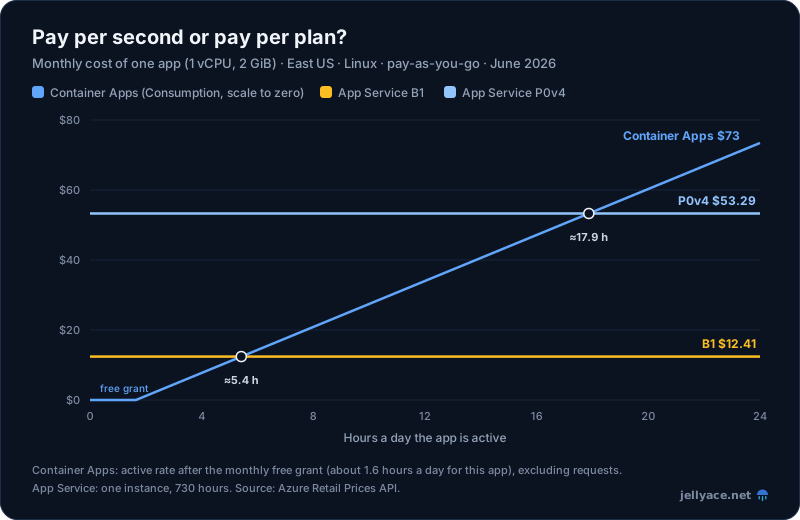
East US, Linux, pay-as-you-go, June 2026. Container Apps on the Consumption plan, after the free grant, excluding request charges.
Scale to zero wins clearly for apps that are busy a few hours a day. For apps that are busy all day, a flat App Service plan wins.
Here are some typical workloads:
| Workload | Container Apps | App Service |
|---|---|---|
| Internal tool, 0.5 vCPU / 1 GiB, used about 2 hours on weekdays | $0 (inside the free grant) | B1: $12.41 |
| Small API kept warm, 1 vCPU / 2 GiB, one replica always running, busy 10% of the time | About $24–28 (mostly the idle rate) | B1: $12.41, or P0v4: $53.29 for autoscale and slots |
| Busy API, 4 vCPU / 8 GiB busy around the clock | Consumption: about $310. Dedicated, one D4 plus the management fee: about $298 | 2 × P1v4: $213.16 |
A few things these numbers don't show:
- The free grant is per subscription, not per app. Ten small apps share one grant.
- App Service packs many apps onto one plan. Five small APIs can share one P1v4 for $106.58 in total. On Container Apps, each one is billed separately.
- Activity lasts longer than the traffic itself. A replica stays active while it handles requests. When traffic stops, Container Apps waits through a cooldown, five minutes by default, before scaling to zero. A request every few minutes can keep a replica running all day.
- Logs cost money on both. Container Apps environments usually send logs to Log Analytics, billed per GB ingested. For a small, chatty app, logging can cost more than compute.
When to choose Container Apps
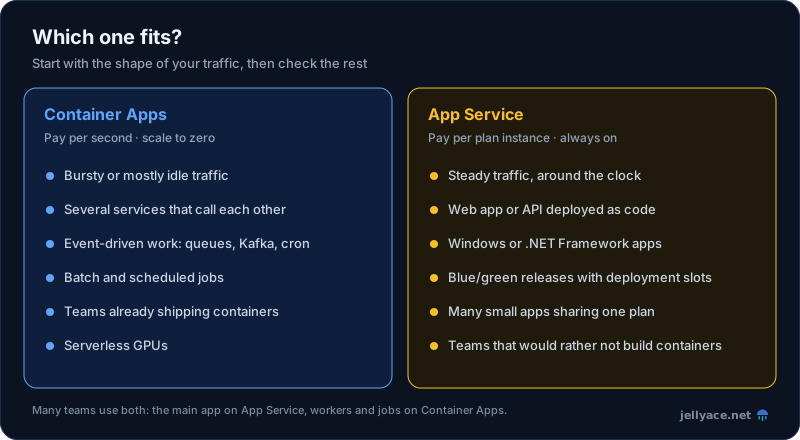
- Traffic is bursty, or the app is idle much of the time. Internal tools, staging and preview environments, webhooks, and APIs with office-hours traffic. Paying nothing while idle is the biggest advantage Container Apps has.
- You're building several services. Apps in one environment find each other by name, can be internal-only, and can use Dapr for messaging and state. On App Service, each app is separate and you wire up networking yourself.
- The work is event-driven. Container Apps scales on queue length, Service Bus, Event Hubs, Kafka or a cron schedule (using KEDA, the Kubernetes event-driven autoscaler), not only on HTTP traffic. A queue worker can sit at zero and scale out when messages arrive.
- You have batch or scheduled jobs. Container Apps jobs run to completion and bill only while running.
- You already ship containers, or want releases that split traffic between revisions, for example 10% to the new version.
- You need GPUs. Container Apps has serverless GPUs that scale to zero. App Service has none.
When to choose App Service
- Traffic is steady, all day. Once an app is busy most hours, a flat plan is cheaper and more predictable.
- You want to deploy code, not containers. Push a .NET, Node.js, Python, Java or PHP app and App Service builds and runs it. No Dockerfile or registry needed.
- It's a Windows app. .NET Framework and other Windows-only workloads run on App Service. Container Apps runs Linux containers only.
- You rely on deployment slots. Deploy to a staging slot, warm it up and swap it into production. It's mature, simple blue/green.
- You run many small apps. One plan holds several apps for one price. Microsoft suggests up to 8 apps on a P0v3 and 16 on a P1v3.
- Cold starts are unacceptable and you don't want to manage minimum replicas. App Service's Always On setting keeps apps warm on Basic and above.
Things to watch
Container Apps:
- Cold starts. At zero, the first request waits for a container to start, from a few seconds to much longer for large images. For user-facing apps, set a minimum of one replica and accept the idle cost.
- Consumption replicas max out at 4 vCPU and 8 GiB. Bigger workloads need Dedicated workload profiles (up to 32 vCPU and 256 GiB).
- Dedicated has a fixed fee. The management fee (about $73 a month) applies whenever the environment uses Dedicated profiles, so Dedicated only makes sense with enough load to share.
- Environments need planning in a VNet. If you put an environment in your own virtual network, its subnet must be sized up front. Changing it later means a new environment.
App Service:
- You pay for the plan, not the app. Stopped apps, idle staging slots and forgotten test apps all cost the full plan price. Delete what you don't use.
- Apps in a plan share its resources. One busy app slows the others, and they all scale out together. Give heavy apps their own plan.
- Basic is limited. No autoscale and no deployment slots. It's fine for small, steady apps, but most production apps end up on Premium.
- Isolation is expensive. If you need full network isolation, an App Service Environment costs several hundred dollars a month per instance.
If you're coming from AWS
As a rough guide, Container Apps is like ECS on Fargate with scale to zero and event-driven autoscaling built in. App Service is closest to Elastic Beanstalk: a managed platform for web apps, where you pay for the instances underneath. (We compared the AWS container options in ECS vs EKS.) Neither Azure service gives you Kubernetes APIs. If you need those, look at Azure Kubernetes Service (AKS).
Which one?
Start with the shape of your traffic.
- Spiky, intermittent or event-driven: Container Apps. You'll often pay less than the cheapest App Service plan, and sometimes nothing at all.
- Steady, all-day traffic, deployed as code, on Windows, or many small apps on one bill: App Service, usually on Premium v3 or v4 rather than Standard.
Teams often end up using both. The main website or API runs on App Service, and workers, jobs and internal tools run on Container Apps. Check the prices in your own Region with the Azure pricing calculator before committing, and revisit the choice when traffic changes: the cost lines cross at a predictable point.